
 Anonsms
 Notificar Parceiros


Com mais de 3 bilhões de usuários ativos, o Facebook se tornou uma plataforma confiável para conectar-se com amigos, familiares, colegas e comunidades online em todo o mundo. Por isso, pode ser surpreendente quando alguém com quem você interage regularmente parece desaparecer de repente. Você não consegue mais ver o perfil dessa pessoa, encontrar suas publicações ou se comunicar com ela como antes.
Como o Facebook não fornece notificações diretas sobre bloqueios, descobrir o que aconteceu geralmente exige uma análise mais detalhada de algumas pistas.
Neste guia, você aprenderá como saber se alguém te bloqueou no Facebook usando vários sinais confiáveis.
Como descobrir se alguém te bloqueou no Facebook
Descobrir se alguém te bloqueou no Facebook exige um pouco de investigação, mas na verdade é muito simples. Fazer estas 8 coisas ajudará a confirmar se você realmente foi bloqueado ou não.
Procure o perfil deles no Facebook.
Uma das maneiras mais fáceis de verificar se alguém te bloqueou no Facebook é procurar o perfil dessa pessoa. Basta digitar o nome completo dela (exatamente como aparece no perfil) na barra de pesquisa principal, no topo da sua página inicial do Facebook. Se o perfil não aparecer, é sinal de que você foi bloqueado.
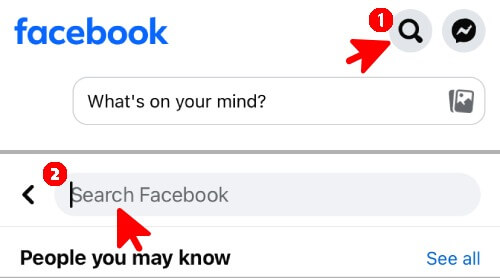
Mas não dá para ter certeza absoluta, porque é preciso considerar: será que me bloquearam ou desativaram o Facebook? Também pode ser que tenham mudado de nome ou ajustado as configurações de privacidade para limitar quem pode encontrá-los.
Confira sua conversa no Messenger
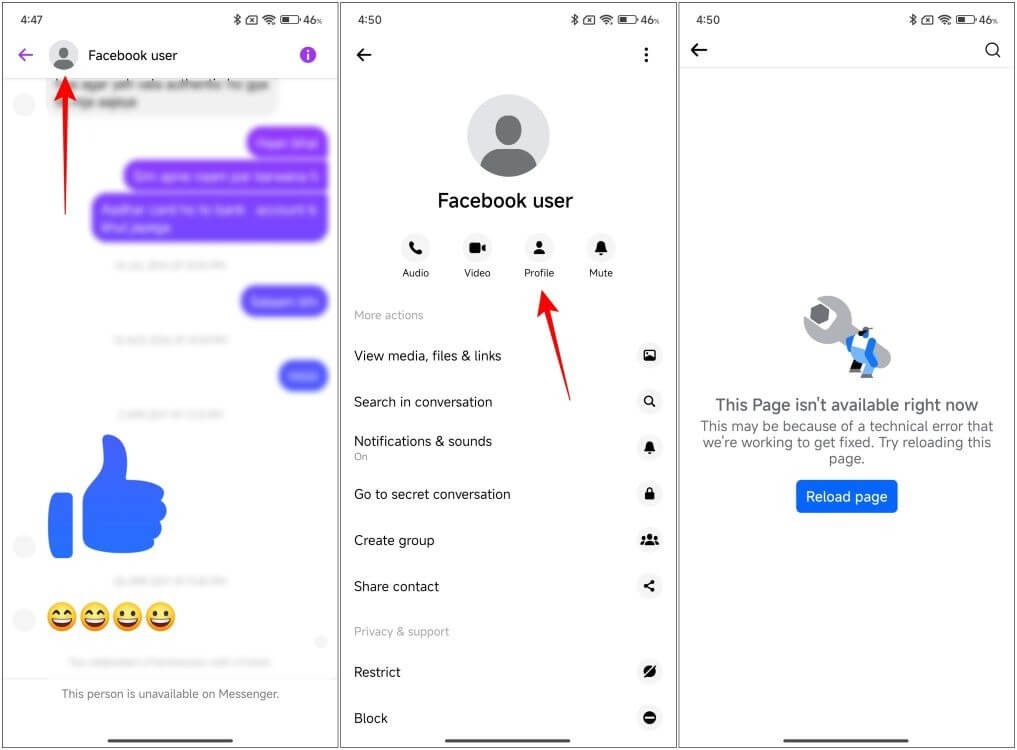
Outra coisa que você pode fazer é verificar suas conversas anteriores com a pessoa no Messenger. Seus chats permanecerão intactos mesmo que ela tenha bloqueado você. Mas se você tentar clicar no nome dela para visualizar o perfil e não conseguir, ou se notar que a foto dela mudou para uma silhueta cinza padrão, então você pode ter certeza de que foi bloqueado(a).
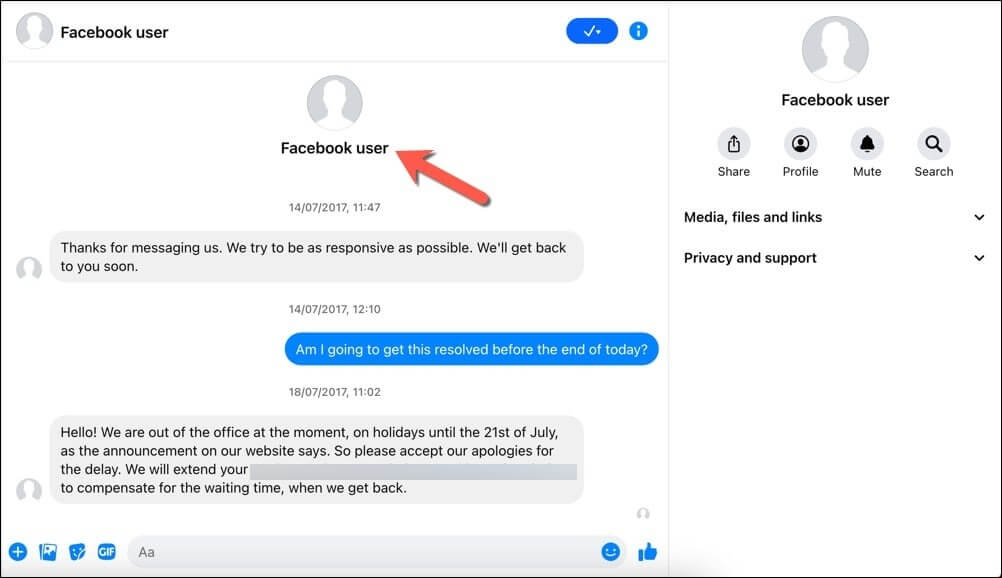
Se você não foi bloqueado, o nome da pessoa será clicável e a foto dela ficará visível.
Tente enviar uma mensagem pelo Messenger.
Você também pode tentar Envie-lhes uma nova mensagem no Messenger. Se você já tiver uma conversa em andamento, a mensagem será entregue com sucesso, mesmo que a pessoa opte por não responder. No entanto, se alguém bloquear você, a mensagem não será enviada. Você verá um alerta ou um pequeno aviso vermelho na parte inferior da tela informando que "Esta pessoa não está disponível no Messenger".
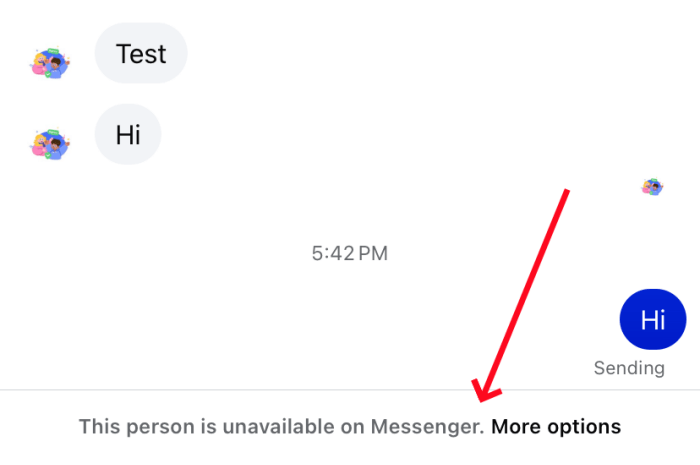
Embora isso possa ser um forte indicador de bloqueio, problemas técnicos e desativação de conta às vezes podem produzir resultados semelhantes.
Verifique se o perfil deles aparece como indisponível.
Outra pista é verificar o perfil da pessoa e comparar como ele aparece quando alguém te bloqueia no Facebook e quando você não está bloqueado.
Se a página deles carregar normalmente e você conseguir ver as publicações, significa que você não foi bloqueado. Mas, se você vir uma página em branco ou uma mensagem de erro dizendo que o conteúdo não está disponível, é um forte indício de bloqueio. Isso significa que o Facebook está ativamente ocultando toda a presença deles da sua conta.
Verifique através de amigos em comum ou outra conta.
Outro método muito eficaz para saber se alguém te bloqueou no Facebook é verificar a atividade dessa pessoa usando a conta de um amigo em comum. Você também pode sair da sua conta principal e usar um perfil secundário para procurar o nome dela na barra de pesquisa principal.
Se o perfil deles aparecer perfeitamente normal em qualquer uma dessas contas, mas permanecer completamente oculto na sua, significa que eles bloquearam você. Mas se o perfil não aparecer para ninguém, significa que eles excluíram ou desativaram a conta completamente.
Analisar tags, comentários e interações antigas
Dê uma olhada em publicações antigas, fotos e conversas em que essa pessoa interagiu com você ou fez comentários. comentário anônimo no seu grupo do Facebook. Se você foi bloqueado, o nome da pessoa ainda aparecerá ao lado dos comentários antigos, mas como um texto preto simples em vez de um link clicável.
Dito isso, isso também pode acontecer quando alguém desativa a conta, exclui conteúdo ou altera as configurações de privacidade. Portanto, não é possível chegar a uma conclusão definitiva com base apenas nesse método.
Experimente os recursos de chamada do Messenger
O Messenger permite que você faça chamadas de voz e vídeo diretamente pelo aplicativo. Abra o histórico de conversas do Messenger com a pessoa e localize o ícone de telefone ou câmera de vídeo no canto superior direito da tela. Toque em qualquer um dos ícones para iniciar uma chamada de áudio ou vídeo.
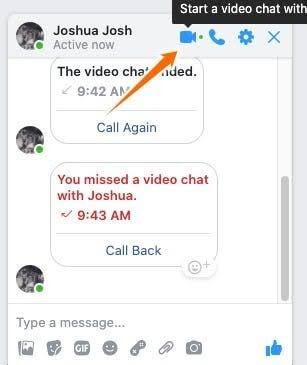
Se alguém bloquear você, o aplicativo interromperá instantaneamente a chamada ou sequer lhe dará a opção de tocar nos botões. Você não ouvirá nenhum toque.
Experimente marcá-los ou convidá-los.
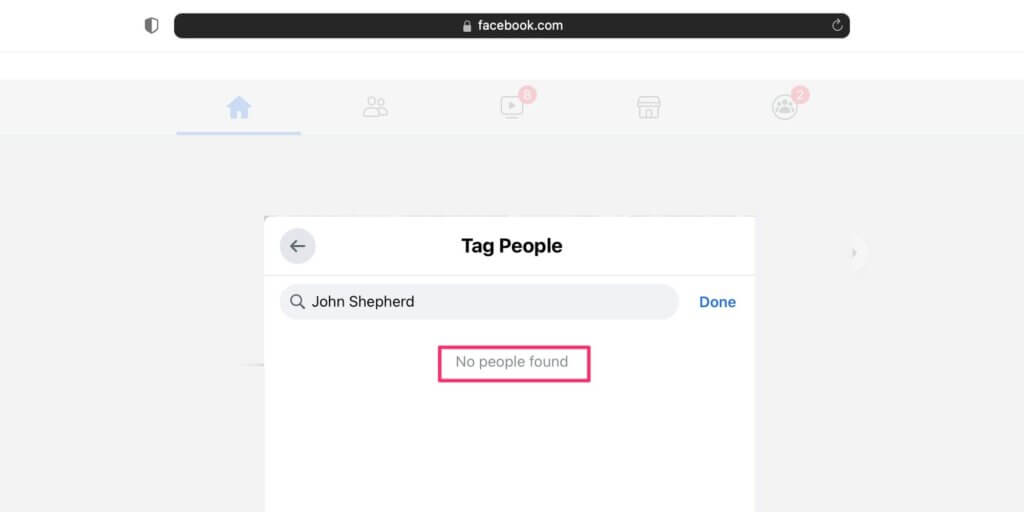
Por último, para saber se alguém te bloqueou no Facebook, tente marcar essa pessoa em uma publicação ou convidá-la para participar de um bate-papo em grupo.
Crie um rascunho para uma nova publicação ou foto no seu feed e tente digitar o nome da pessoa para marcá-la. Tente também criar um evento ou grupo de teste e convide-a para participar. Se ela tiver bloqueado você, o nome dela não aparecerá como sugestão clicável no menu suspenso em nenhuma das duas situações.
Você está bloqueado no Facebook ou apenas no Messenger?
Ser bloqueado no Facebook é bem diferente de ser bloqueado no Messenger. Se alguém te bloquear no Facebook, você não poderá encontrar o perfil dessa pessoa, ver as publicações dela, marcá-la ou enviar mensagens para ela no Messenger.
No entanto, se eles bloquearem você apenas no Messenger, você ainda poderá ver o perfil, as fotos e os comentários deles no Facebook, mas não poderá enviar mensagens nem fazer chamadas pelo Messenger.
Portanto, é aconselhável verificar tanto o Facebook quanto o Messenger para determinar que tipo de bloqueio ocorreu.
Os sinais de bloqueio do Facebook não contam toda a história.
Para descobrir se alguém te bloqueou no Facebook, é preciso analisar vários indícios, e não apenas um. Embora sinais como perfil ausente, mensagens não entregues ou interações restritas possam apontar para um bloqueio, nenhum deles, por si só, fornece confirmação definitiva.
No entanto, se você precisar entrar em contato com alguém com urgência e essa pessoa não estiver disponível no Facebook, você pode enviar uma mensagem usando Anonsms. Este serviço contorna bloqueios em diversas plataformas e permite que você se comunique anonimamente com qualquer pessoa, em qualquer lugar do mundo.
Perguntas frequentes
Aqui estão as respostas para algumas das perguntas mais comuns sobre como funciona o bloqueio no Facebook e no Messenger.
- Como saber se alguém te bloqueou no Facebook?
Você pode descobrir pesquisando o nome da pessoa na barra de pesquisa, verificando a lista de amigos em comum ou analisando comentários antigos. Se o perfil dela desapareceu completamente para você, mas ainda está visível para outras pessoas, e você não consegue marcá-la em suas publicações, é provável que você tenha sido bloqueado(a).
- Como saber se você foi bloqueado no Messenger?
Se você for bloqueado no Messenger, não poderá enviar mensagens nem fazer chamadas de voz ou vídeo com a pessoa.
- O que acontece quando você bloqueia alguém no Facebook?
Quando você bloqueia alguém no Facebook, essa pessoa não poderá ver seu perfil, suas publicações, suas marcações ou seus comentários. É semelhante a... Como saber se alguém te bloqueou no Instagram.
- Alguém fica sabendo quando você bloqueia essa pessoa?
Não, o Facebook não envia alertas ou notificações para ninguém que você bloqueie. Isso faz parte da política da plataforma para manter em sigilo suas decisões sobre com quem você se conecta.
- Eles me bloquearam ou desativaram o Facebook?
Você não consegue perceber imediatamente porque ambas as ações parecem idênticas na sua conta. No entanto, se amigos em comum ainda conseguem ver o perfil enquanto você não, significa que você foi bloqueado. Mas se ninguém consegue encontrar a conta, ela foi desativada.
- Qual a diferença entre bloquear e desfazer a amizade?
"Desfazer amizade" significa que você foi removido da lista de amigos de alguém, mas ainda pode ver o perfil dessa pessoa e enviar mensagens. "Bloquear", por outro lado, significa que você não pode mais ver o perfil dela nem ter qualquer tipo de conversa com ela.
- O que uma pessoa bloqueada vê no Facebook?
Uma pessoa bloqueada não vê absolutamente nada no seu perfil do Facebook. Para ela, sua conta deixa de existir. Sua página não aparece nos resultados de busca, seu perfil desaparece e seu nome em conversas antigas se transforma em texto ilegível.
Artigos relacionados:
Como saber se alguém te bloqueou no WhatsApp?
 Portuguese
  English
  German
  Spanish
  Italian
  Turkish
  French
  Russian
  Czech
Czech  Finnish
  Danish