
 Anonsms
 NotifyPartners


Snapchat makes it easy to connect with family, friends, and even new people you meet on the internet. But just like how every relationship can go through hard times, you might have some disparities that may lead to a temporal or permanent breakdown in communication.
Like most social media platforms, Snapchat does not explicitly tell you if you’ve been blocked or not. This might make you start thinking: Did they block me or did they remove me as a friend?
In this guide, we will explore how to know if someone blocked you on Snapchat, and what to do afterward.
7 Simple Ways to Check If Someone Blocked You on Snapchat
Explained below are the 7 easy ways to confirm if someone blocked you on Snapchat or not.
NOTE: A single sign is usually not enough to confirm that you’ve been blocked because the same thing can happen when someone removes you as a friend, changes privacy settings, or deletes their account. The best approach is to check for several of these signs. If there are multiple of them, then there’s a much greater chance that the person blocked you.
Review Your Recent Chats
The easiest way to know whether you’ve been blocked or not is to check your chat history. Open Snapchat and tap the Chat tab to view your recent conversations. The Chat tab is by the left side of the camera button.
If you’ve exchanged messages with the person before, their display name would appear in your Chat page. But if you can’t find the conversation, bear it in mind that you may have been blocked.
However, this is not always the case because your conversation can also disappear if the person deletes their account or if both of you haven’t been chatting for a while. Sometimes, Snapchat removes inactive conversations and fills the Chat page with more recent conversations.
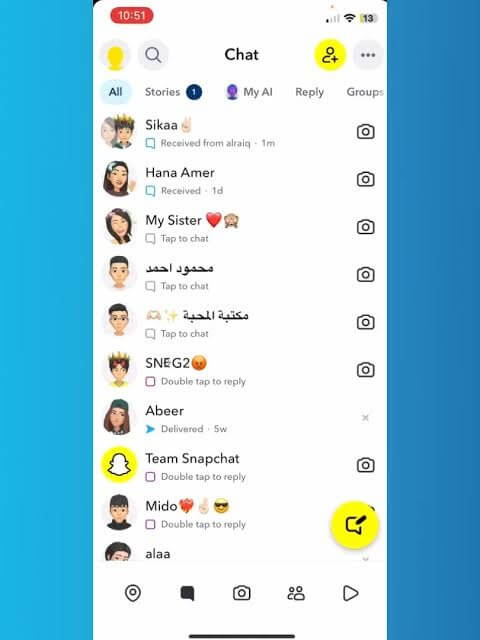
So, you should consider whether you’ve interacted with the person recently. If you were chatting regularly and the conversation suddenly vanished overnight, that is suspicious. And in some cases, it could be that you mistakenly cleared the conversation from the Chat page.
Search for Their Username
Another useful method is searching for the person’s account directly via their username. Open Snapchat and tap the search icon at the top-left corner of the screen. Enter the person’s full username if you know it.
This is where it usually gets tricky for most people. Usernames are often mistaken for Display Names. Similar confusion can occur when you check how to know if someone blocked you on Instagram.
Let’s clarify what they are.
- Username: The unique account identifier that cannot easily be changed.
- Display Name: The customizable name shown to friends.
The Display Name can be changed at any time, making it harder for you to know what to identify the person by. This is to say, if you search only by display name, you might mistakenly think they blocked you when they simply updated their profile. Thus, for how to know if someone has blocked you on Snapchat, conduct the search using their Username.
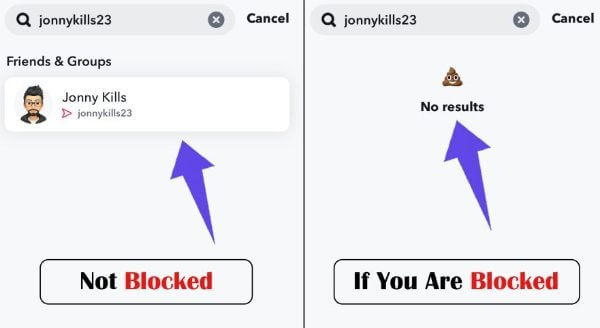
Mind you, usernames are not always straightforward. Most people combine lowercase and uppercase letters. Some even add numbers and symbols. A simple typo won’t allow you to get the person’s account. If you previously saved screenshots, old chats, or contact information containing their username, use those details instead of relying on your memory.
Use Another Account to Search
If you don’t find the person’s account after searching their username, it’s likely that they’ve blocked you. But don’t rush to decide without conducting the same search from a different Snapchat account.
If you have another Snapchat account that the person doesn’t know, make the search there. And if you don’t, create a new account or use a trusted friend’s own to perform the search. If the person’s username appears on the other Snapchat account, that’s a strong sign that your suspicion is real.
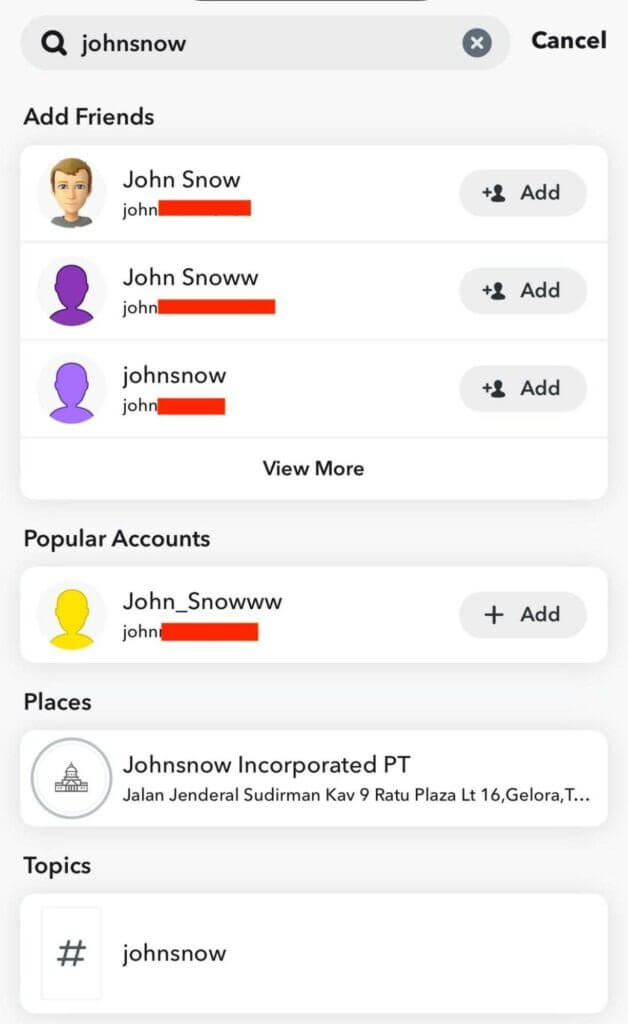
This method is especially useful because it eliminates the other guesses of whether their account was deleted or deactivated. It points more directly toward a block or account-specific restriction.
Look Through Your Friends List
Another clue on how to know if someone has you blocked on Snapchat is to check your friends list. Open Snapchat and click on your profile photo at the top-left corner of the screen. Scroll down to the “My Friends” section. Click on it and search for the person’s account.
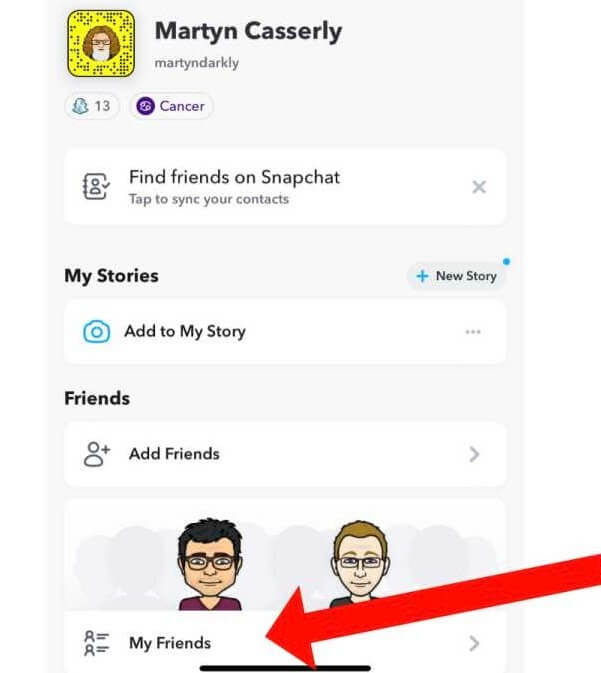
If you don’t see the person in your friends list anymore, there are several explanations for that. It could be that they blocked you, removed you as a friend, or deleted their Snapchat account.
Being removed from someone’s friend list is not necessarily the same as being blocked. Snapchat allows users to remove friends without preventing future communication. If they removed you, you can still add them as friends and chat. But if their account was deleted, you won’t be able to contact them again.
Some people may argue that removing someone as a friend, especially after a private conversation is the best way to keep things a secret. But that’s usually not the case. Snapchat is one of the best apps for hiding messages; it automatically deletes chats after 24 hours except the ones you manually save.
Try Sending a Snap Message
Basically, if someone blocks you on Snapchat, you won’t be able to communicate with them again. To verify if you’ve been blocked, send them a message or snap.
Watch what happens afterward:
- Does the message remain pending indefinitely?
- Does Snapchat fail to deliver it?
- Do you receive an error message?
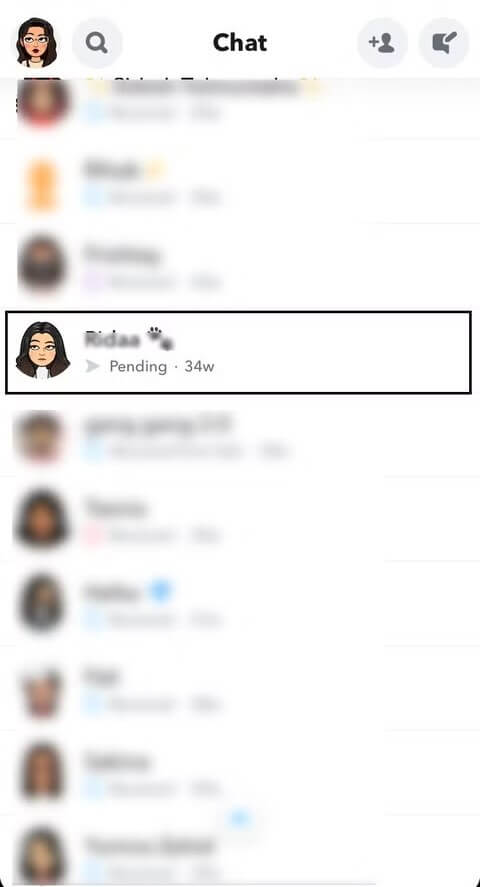
Asides from being blocked, message delivery failure can occur because of internet connectivity problems or account deletion. Thus, just like other signs, message delivery should not be used as the only test. Instead, combine it with others like username searches and friends list checks for greater accuracy.
However, if previous messages showed as delivered but newer messages remain pending for an extended period while other Snapchat conversations work normally, that may suggest a problem specific to your relationship with the person rather than internet problem.
Check If Their Snap Score is Available
Another obvious sign that people don’t usually pay attention to is Snap Score visibility.
If you’re not very conversant with how Snapchat operates, you may be wondering, what is Snap Score? A Snap Score is a numerical value that reflects Snapchat activity, including sent and received Snaps. When you are friends with someone on Snapchat, you can view their Snap Score by opening their profile.
Open Snapchat, tap the search icon at the top-left corner of the screen, and search for their account. Once you find it, tap on the profile picture. You will see the Snap Score in their profile if they have you on their friends list.
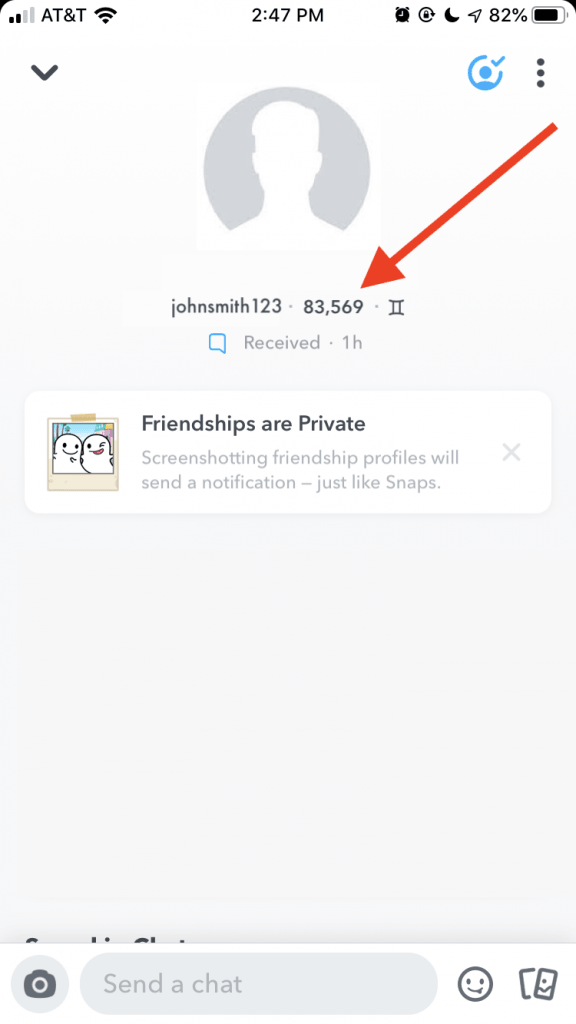
If you previously had access to their Snap Score but can no longer see it, one of these has happened:
- They removed you as a friend.
- They adjusted privacy settings.
- They blocked you.
A missing Snap Score alone does not definitely prove a block. Think of it as a supporting clue rather than a primary test. It works best when used alongside other methods in this guide.
See Whether Their Story is Still Visible
If you regularly view someone’s Snapchat Stories and suddenly stop seeing them, you may wonder whether you’ve been blocked.
First, consider the obvious explanations:
- They stopped posting Stories.
- They changed Story privacy settings.
- They hid Stories from specific users.
If none of these explanations seem likely, ask your mutual friends if they can still view their Stories. If others can see their Stories while you cannot find their profile, send messages, or view their content, blocking becomes a more likely explanation.
Friend Removal vs. Block vs. Deleted Account Comparison Table
Sometimes, Snapchat users configure their privacy settings to allow only a few people to communicate with them. This is common with users who engage with anonymous interaction features or want to do anonymous questions on Snapchat.
Other times, it could be that their account has been deleted or deactivated. It can intentionally be deleted by them or deactivated by Snapchat due to breach of policies.
This is to tell you that there are other possibilities aside from being blocked. The table below shows cases where it’s obvious that you’ve been blocked, removed as a friend, or the person’s account was deleted.
| Situation | Search | Chat | Snap Status | Story |
| Blocked | Hidden | Missing | Pending | Hidden |
| Removed | Visible | Limited | Pending | Maybe |
| Deleted account | Missing | Missing | Failed | Hidden |
Can I Contact Someone If They Blocked Me on Snapchat?
It’s usually best to respect people’s privacy. But there are some situations where you have to bypass privacy and contact them regardless. It could be to pass important or time-sensitive information.
In cases like that, here are the things you can do:
- Use Another Snapchat Account: Create a new Snapchat account to contact them with. If you have a secondary account already, you can use that. But keep in mind that if they blocked you intentionally, they may block the new account as well.
- Different Social Media Platform: If you’re connected with the person on other social media platforms like Instagram, Facebook, or X, you can send a polite message there. If they choose not to respond, don’t send them repeated messages.
- Anonymous Texting Website: If you don’t have access to the person’s other contact details or you want to protect your privacy while you message them, an anonymous texting service like Anonsms is the most reliable option. Just go to the Anonsms website, enter the person’s phone number, type your message, and send. Your message will be delivered instantly and your identity will be kept a secret.
Conclusion
You can be left unsure for ages if someone blocked you on Snapchat or they simply restricted you from interacting with them as much as you used to do. It may even be that they got their account deleted/deactivated.
Really, how to know if someone blocked you on Snapchat is to explore all the methods we’ve discussed above. Remember, none of them works singlehandedly as a yardstick. You need to check out for multiple signs.
Common Questions
If you still have questions about how to find out if someone blocked you on Snapchat, check out the answers to these frequently asked questions for more clarity.
- How to block someone on Snapchat?
To block someone on Snapchat, open their profile, tap the three-dot menu in the top-right corner, and select Manage Friendship. Then, click Block. You will be asked if you’re sure you want to block the person, click Block.
- How to unblock someone on Snapchat?
Open Snapchat, tap your profile icon, then go to Settings. Scroll down to the Privacy Controls section and click on Blocked Users. Find the person you want to unblock and tap the cancel button beside their name. Once unblocked, they won’t automatically return to your friends list. You will have to send them a new friend request.
- Can someone block and unblock you?
Yes. Snapchat allows users to block and unblock others whenever they choose. A person can block you temporarily and later remove the block. Snapchat does not notify you when this happens.
- How do you delete contacts on Snapchat?
To remove a contact, locate the person’s profile, tap the three dot menu icon at the top-right corner, and choose Manage Friendship. Then select Remove Friend. You will be asked if you’re sure you want to remove the person, click Remove.
- How to delete a Snapchat account?
Go to accounts.snapchat.com and sign in to your account. Select Delete My Account. Your account will first enter a deactivation period. If you do not log back in within 30 days, Snapchat permanently deletes the account.
- Can you still message someone who blocked you on Snapchat?
No. When someone blocks you, Snapchat prevents direct communication between both of you. Any message you send will not be delivered.
- What happens when someone blocks you on Snapchat?
When blocked, you typically lose access to the person’s profile, Stories, and direct communication. Their account will disappear from your searches, chats, and friends list.
- Does Snapchat notify you when someone blocks you?
No. Snapchat does not notify users when they have been blocked. This app has a privacy policy that allows users to manage who they friend and who they block without generating alerts.
- Why would someone block me on Snapchat?
You may be blocked for many reasons, such as privacy concerns, personal boundaries, disagreements, or simply because they want less online interaction.
- Should I contact them elsewhere?
If you suspect you’ve been blocked, consider respecting their decision. Contacting them elsewhere is appropriate only if you have an existing relationship and a legitimate reason to reach out.
- What to do if blocked?
If someone blocks you on Snapchat, the best approach is to respect their choice and avoid repeated attempts to contact them. Focus on maintaining healthy communication with people who wish to engage with you.
Related articles:
How to Do Anonymous Questions on Instagram? [Simple Ways]

 English
  German
  Spanish
  Italian
  Turkish
  French
  Russian
  Portuguese
  Czech
Czech  Finnish
  Danish