
 Anonsms
 Benachrichtigen Sie Partner


Telegram gehört zu den wenigen Apps, mit denen man ganz einfach über Nachrichten, Sprach-/Videoanrufe und Gruppenchats mit Freunden und Familie in Kontakt bleiben kann. Aus Datenschutzgründen werden Sie nicht benachrichtigt, wenn Sie blockiert werden. Es gibt jedoch einige Anzeichen, die Ihnen helfen können, festzustellen, ob Sie blockiert wurden oder nicht.
In diesem Artikel erklären wir, wie Sie herausfinden können, ob Sie jemand auf Telegram blockiert hat, und bieten eine alternative Möglichkeit, diese Person zu erreichen, falls die Kommunikation über Telegram fehlschlägt.
Wie erkennt man, ob man auf Telegram blockiert wurde?
Um herauszufinden, ob dich jemand auf Telegram blockiert hat, überprüfe seinen Online-Status, schau dir sein Profilbild an, schicke ihm eine Nachricht oder versuche, ihn anzurufen. Vergleiche anschließend, wie es aussieht, wenn du blockiert bist, und wie es aussieht, wenn du nicht blockiert bist.
Überprüfen Sie ihren Online-Status
Einer der Grundlegende Möglichkeiten, um herauszufinden, ob dich jemand blockiert hat Auf Telegram kann man den Online-Status überprüfen. Normalerweise wird ein ungefährer Zeitraum angezeigt, wann die Person zuletzt aktiv war. Steht dort aber plötzlich “Vor langer Zeit online” oder verschwindet der Status ganz, könnte das bedeuten, dass du blockiert wurdest.
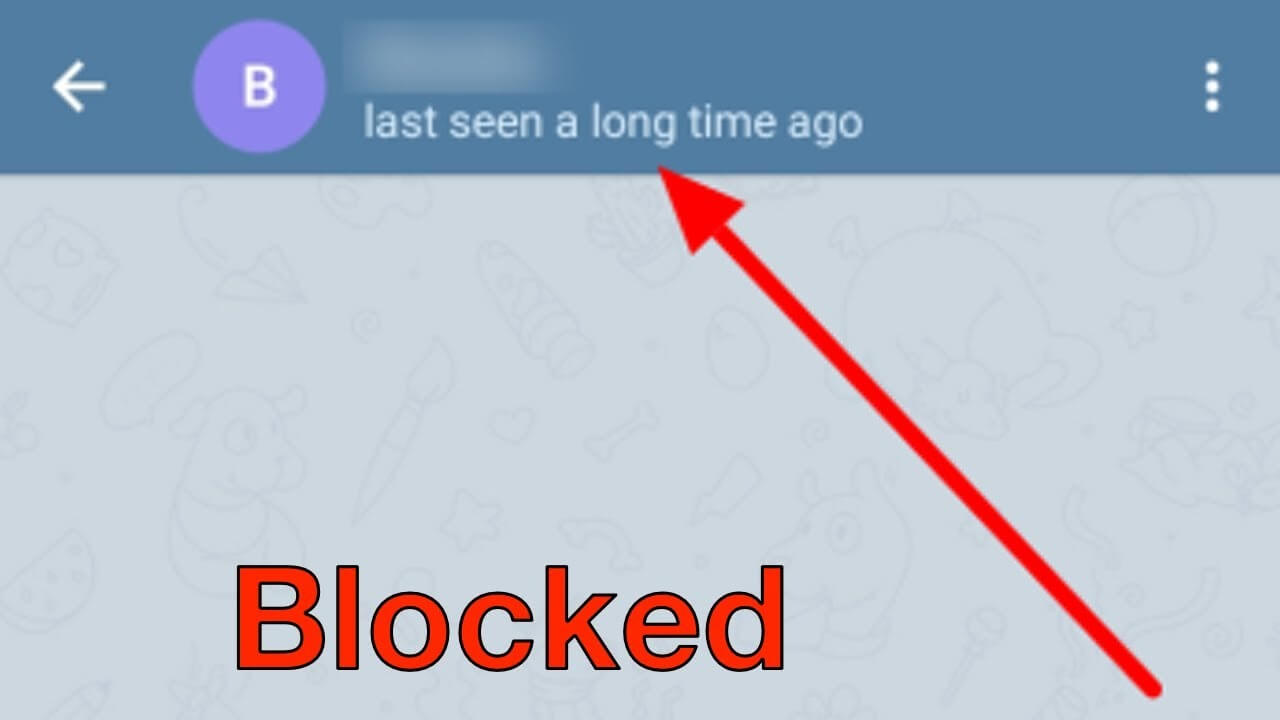
Allerdings können sich auch die Datenschutzeinstellungen darauf auswirken, was angezeigt wird, sodass man sich nie ganz sicher sein kann.
Schau dir ihr Profilbild an
Als Nächstes solltest du dir das Profilbild der Person genauer ansehen. Solange du nicht blockiert bist, siehst du ihr individuelles Foto. Sobald dich jemand blockiert, verschwindet das Foto sofort. Stattdessen siehst du dann einen farbigen Kreis mit den Initialen der Person.
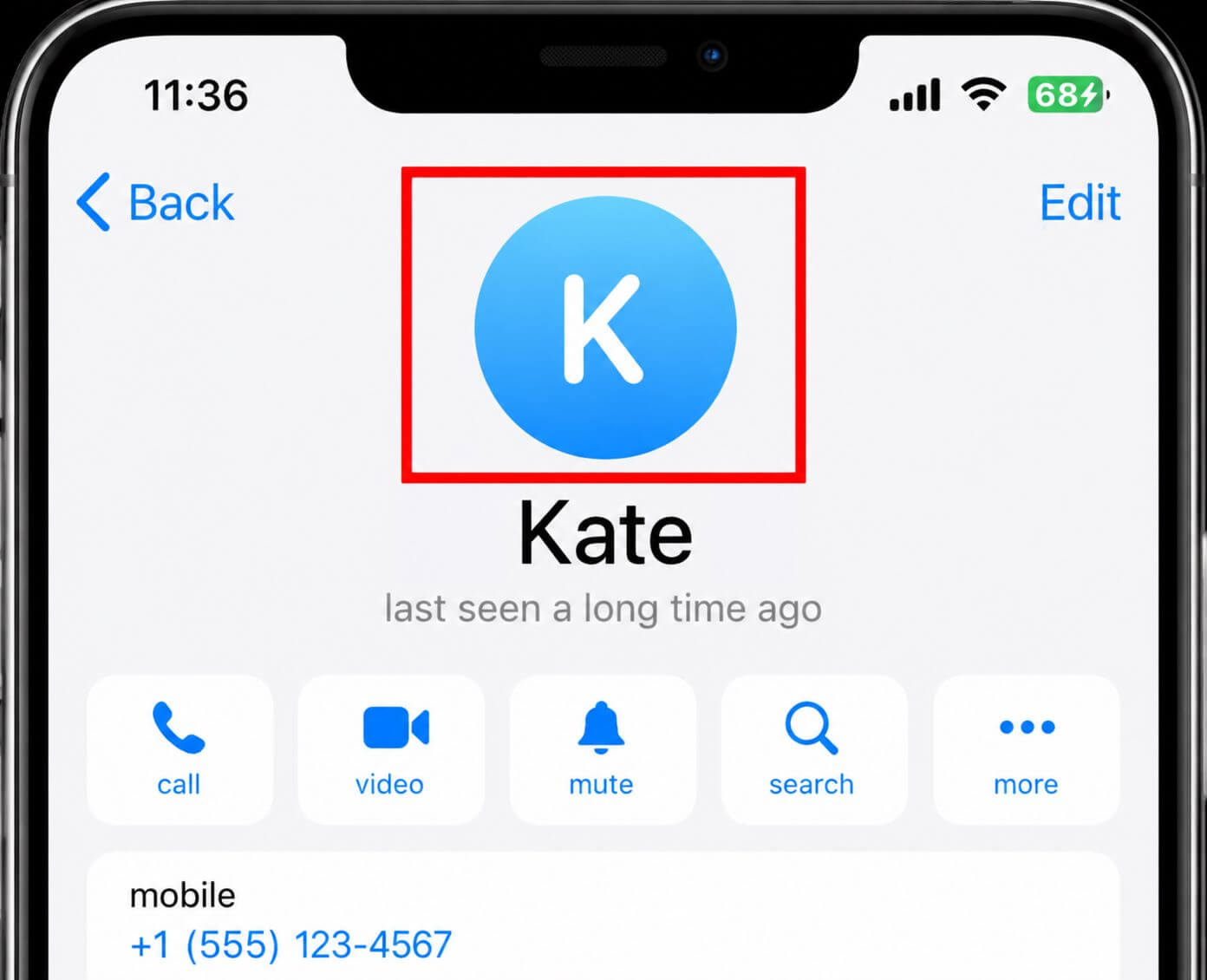
Während manche Nutzer ihre Fotos entfernen oder einschränken, wer sie sehen kann, könnte eine plötzliche Änderung bedeuten, dass Sie gesperrt wurden.
Sende ihnen eine Nachricht
Sie können auch Sende ihnen eine private Nachricht Um Ihren Status zu überprüfen: Wenn Ihre Nachricht stets nur ein Häkchen anzeigt und nie zu einem Doppelhäkchen wechselt, sind Sie mit ziemlicher Sicherheit blockiert.
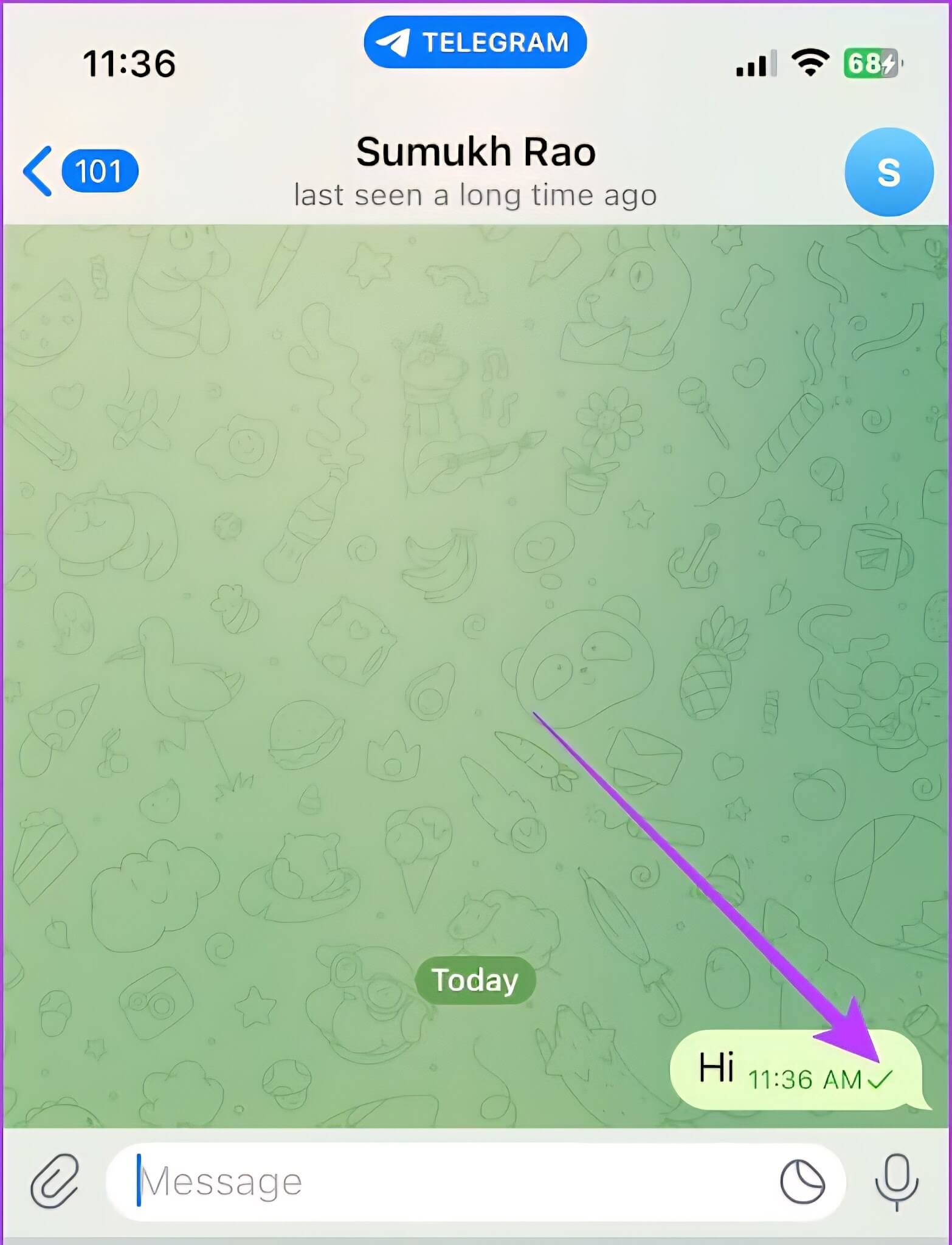
Zur besseren Verständlichkeit hier die Bedeutung des Telegramm-Häkchens:
- Ein Häkchen Das bedeutet, dass Ihre Nachricht an die Server von Telegram gesendet, aber noch nicht an den Empfänger zugestellt wurde.
- Zwei Häkchen Das bedeutet, dass Ihre Nachricht nicht eingeschränkt wurde und dem Empfänger zugestellt wurde.
Versuche, sie über Telegram anzurufen.
Sie können auch versuchen, die Person per Sprach- oder Videoanruf zu erreichen. Wenn Sie blockiert sind, kommt der Anruf nicht zustande. Er bricht entweder sofort ab oder zeigt sehr lange “Verbinden” an.
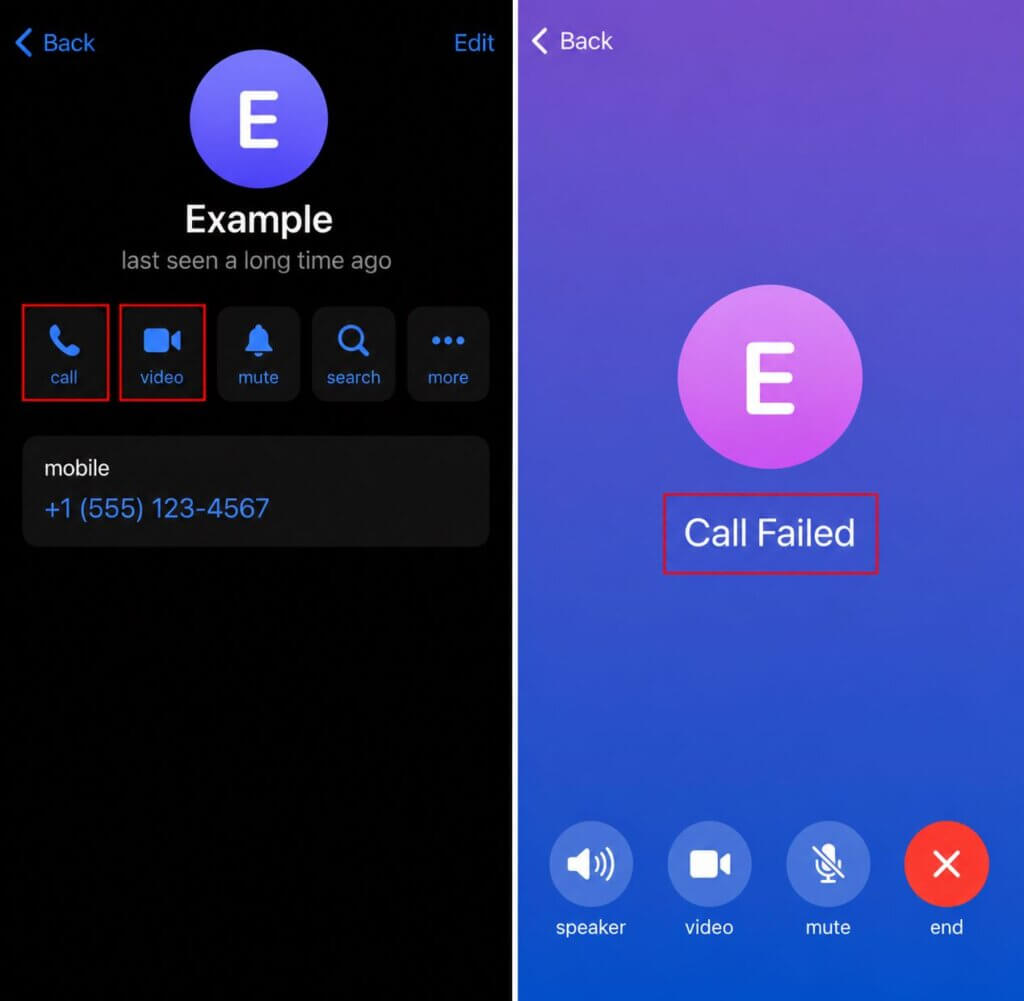
Das kann zwar auch passieren, wenn die Person offline ist oder keine stabile Internetverbindung hat. Sollte es aber jedes Mal bei jedem Anrufversuch vorkommen, wurden Sie möglicherweise blockiert.
Vergleiche, was du von einem anderen Telegram-Konto siehst.
Falls Sie Zugriff auf ein anderes Telegram-Konto haben, insbesondere das eines gemeinsamen Freundes, nutzen Sie dieses, um das Profil der Person zu überprüfen, die Sie möglicherweise blockiert hat. Vergleichen Sie anschließend Ihr eigenes Profil mit dem Profil der anderen Person.
Wenn das andere Konto das Profilbild, den Online-Status und weitere Informationen der Person sehen kann, Ihr Konto dies aber nicht kann, dann ist es fast sicher, dass Sie gesperrt wurden.
Versuche, sie einer Telegram-Gruppe hinzuzufügen.
Ein letzter Test besteht darin, die Person zu einem neuen Telegram-Gruppenchat hinzuzufügen. Sollte dies wiederholt fehlschlagen und Telegram die Fehlermeldung “Dieser Nutzer kann aufgrund seiner Datenschutzeinstellungen nicht zu Gruppen hinzugefügt werden” anzeigen, bedeutet dies, dass die Person Sie möglicherweise blockiert hat.
Da jedoch strenge Datenschutzeinstellungen genau dieselbe Fehlermeldung auslösen, können Sie sich nicht allein auf den Test mit Gruppeneinladungen verlassen.
Durch Datenschutzeinstellungen blockiert, gelöscht oder ausgeblendet?
Viele Anzeichen dafür, dass dich jemand auf Telegram blockiert hat, können auch auftreten, wenn jemand sein Telegram-Konto löscht oder seine Datenschutzeinstellungen ändert. Die folgende Tabelle verdeutlicht die Gemeinsamkeiten und Unterschiede dieser drei Situationen.
| Zeichen | Blockiert | Gelöschtes Konto | Änderung der Datenschutzeinstellungen |
| Letzter Online-Status | Zuletzt gesehen vor langer Zeit | Zuletzt gesehen vor langer Zeit | Zuletzt gesehen vor kurzem |
| Profilbild | Ein blauer Kreis mit den Initialen der Person | Ein Geistersymbol in einem farblosen Kreis | Sichtbar, wenn Sie in deren Kontakten gespeichert sind. |
| Nachrichtenübermittlung | Bei einem Häkchen feststecken | Bei einem Häkchen feststecken | Fortschritte bis zu zwei Häkchen |
| Sprach-/Videoanrufe | Anrufe schlagen sofort fehl oder zeigen “Verbindung wird hergestellt” an.” | Anrufe schlagen sofort fehl. | Anrufe klingeln normal |
| Einladungen zum Gruppenchat | Schlägt mit einer Fehlermeldung fehl | Fehler, da der Kontoname nicht anklickbar ist | Hängt von den Einstellungen ab |
Wenn die Telegram-Kommunikation nicht funktioniert
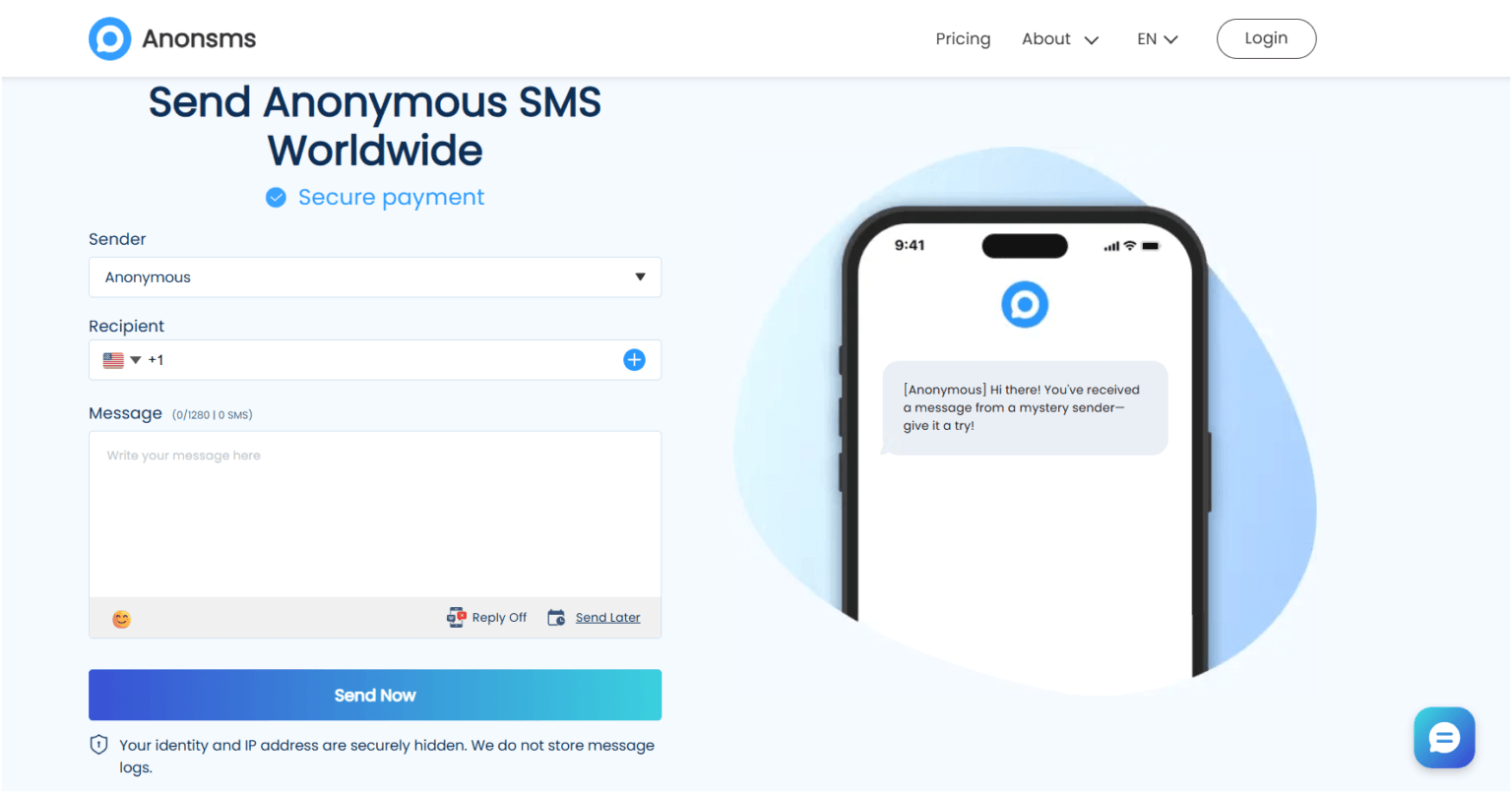
Wenn Sie aufgrund einer Blockierung nicht mehr über Telegram kommunizieren können, Der beste Weg, um Textnachrichten an Menschen überall auf der Welt zu senden. erfolgt über Anonsms. Diese Plattform nutzt ein virtuelles SMS-Gateway, um die Nachricht an den Empfänger zuzustellen und dabei jegliche Blockierungen oder Einschränkungen zu umgehen.
Neben privaten Nachrichten können Sie Anonsms auch nutzen, um Überraschungsveranstaltungen zu koordinieren, ehrliches Feedback einzuholen, diskret zu erinnern oder Benachrichtigungen zu versenden und Massenankündigungen durchzuführen.
Da es komplett online funktioniert, ist der Einstieg schnell und unkompliziert. Sie müssen lediglich Folgendes tun:
Schritt 1: Besuchen Anonsms.com
Schritt 2Wählen Sie das Zielland aus und geben Sie die Telefonnummer des Empfängers ein.
Schritt 3Geben Sie Ihre Nachricht ein und klicken Sie auf “Jetzt versenden„
Abschließende Überlegungen
Es gibt keine direkte Möglichkeit festzustellen, ob dich jemand auf Telegram blockiert hat. Du musst auf eine Kombination aus mindestens zwei der oben genannten Anzeichen achten. Je mehr Anzeichen du bemerkst, desto wahrscheinlicher ist es, dass du blockiert wurdest.
Häufig gestellte Fragen
- Wie kann man feststellen, ob einen jemand auf Telegram blockiert hat?
Typische Anzeichen dafür, dass dich jemand auf Telegram blockiert, sind: Deine Nachrichten bleiben bei einem Häkchen hängen, das Profilbild der Person verschwindet, der Online-Status ändert sich zu “zuletzt vor langer Zeit online”, deine Sprach- und Videoanrufe schlagen fehl und du kannst die Person keiner Gruppe hinzufügen.
- Bedeutet ein Häkchen immer, dass man gesperrt ist?
Nein. Ein Häkchen bedeutet lediglich, dass Ihre Nachricht die Telegram-Server erreicht hat, aber noch nicht an den Empfänger zugestellt wurde. Neben einer möglichen Blockierung kann dies auch daran liegen, dass der Empfänger offline ist, keine Internetverbindung hat oder die App deinstalliert hat.
- Was bedeutet „zuletzt auf Telegram gesehen“?
“Zuletzt online” in Telegram bedeutet, dass die Person Telegram vor etwa einer Sekunde bis vor drei Tagen geöffnet hat. Diese Anzeige erscheint, wenn der genaue Anmeldezeitpunkt verborgen ist.
- Wie sieht es aus, wenn dich jemand auf Telegram blockiert?
Wenn dich jemand auf Telegram blockiert, ändert sich sein Profilbild zu einem generischen Symbol mit Initialen, sein Status wird als “zuletzt vor langer Zeit online” angezeigt, deine Nachricht wird nie als Antwort angezeigt und deine Anrufe schlagen sofort fehl oder bleiben bei “Verbindung wird hergestellt” hängen.
- Was passiert, wenn man jemanden auf Telegram blockiert?
Wenn du jemanden blockierst, sieht diese Person weder dein Profilbild noch deinen Online- und Online-Status. Nachrichten und Anrufe erreichen dich ebenfalls nicht mehr, und du kannst nicht mehr zu neuen Gruppenchats hinzugefügt werden.
- Kann man jemanden auf Telegram finden, wenn man blockiert wurde?
Ja, du kannst ihr Konto weiterhin über die Suche oder deine Kontaktliste finden. Wenn du blockiert wirst, wird ihr Konto nicht ausgeblendet und der bestehende Chatverlauf nicht von deinem Gerät gelöscht.
- Verschwindet das Profilbild, wenn man auf Telegram blockiert wird?
JA, das Profilbild der Person verschwindet sofort und wird durch einen Standardavatar mit ihren Initialen ersetzt.
Verwandte Artikel:
So blockieren Sie Ihre Nummer: 5 einfache Wege, um Ihre Privatsphäre zu schützen
Wie Sie mit einer lustigen anonymen SMS das Eis mit Ihrem Schwarm brechen
Wie man anonym wieder Kontakt zu einem alten Freund aufnimmt



 German
  English
  Spanish
  Italian
  Turkish
  French
  Russian
  Portuguese
  Czech
Czech  Finnish
  Danish