
 Anonsms
 УведомитьПартнеров


Иногда вам может понадобиться отправить личное текстовое сообщение, при этом ваш номер телефона должен быть скрыт. Независимо от причины — будь то защита конфиденциальности, разовый разговор или обсуждение деликатного вопроса — существует несколько способов это сделать.
В этом руководстве мы покажем вам, как отправлять личные сообщения простыми, но анонимными способами, которые невозможно отследить до вашей личности.
Что такое личное сообщение?
Личное сообщение — это сообщение, отправленное получателю без отображения какой-либо вашей личной информации (например, номера телефона). Вместо отправки сообщения с вашего личного номера, его можно отправить через анонимный мессенджер, временный номер, шлюз электронной почты в текстовые сообщения или другую секретную службу связи.
Однако, хотя эти средства связи могут помочь защитить вашу личность, содержание вашего сообщения не должно содержать никакой информации, которая может поставить под угрозу вашу конфиденциальность.
Зачем мне отправлять личные сообщения?
Есть много законные причины, по которым некоторые из ваших текстовых сообщений могут нуждаться в отправке в частном порядке. По сути, отправка личных сообщений позволяет вам лучше контролировать, кто имеет доступ к вашему реальному номеру телефона, и при этом эффективно общаться.
Наиболее распространённые причины:
- Защита вашего личного номера телефона.
- Как избежать спам-звонков и нежелательных сообщений.
- Связаться с кем-либо для разовой беседы.
- Общение во время совершения сделок на онлайн-торговой площадке.
- Как сохранить конфиденциальность при знакомствах в интернете.
- Обсуждение деликатных или личных вопросов.
- Разделение личной и деловой переписки.
- Отправка конфиденциальных сообщений или отзывов.
- Защита вашей личной информации во время путешествия.
- Общение с людьми, которых вы плохо знаете.
- Предотвращение нежелательных контактов в будущем.
- Тестирование сервисов или учетных записей, требующих номера телефона.
Как отправить личное сообщение, не показывая свой номер телефона?
Ниже описаны различные способы отправки личных текстовых сообщений без указания номера телефона. Изучите каждый из них, чтобы выбрать тот, который обеспечит вам необходимую степень конфиденциальности.
Используйте анонимный сайт для отправки SMS-сообщений.
В интернете существует множество анонимных сайтов для отправки SMS-сообщений. Некоторые из них бесплатны, другие — платные. Хотя оба типа позволяют отправлять сообщения без запроса номера телефона, бесплатные сайты не гарантируют конфиденциальность. Они могут хранить данные пользователей, такие как IP-адреса, местоположение и сами сообщения, что в конечном итоге может поставить под угрозу вашу безопасность.
Таким образом, чтобы отправить анонимное сообщение с гарантией того, что вас не раскроют, следует использовать надежные альтернативы, такие как Anonsms. Это один из... лучшие анонимные приложения для обмена сообщениями в приватной обстановке, Отличительной чертой является то, что система не хранит информацию о пользователях. Фактически, сообщения удаляются с серверов вскоре после отправки, что гарантирует отсутствие какой-либо связи между ними и вами.
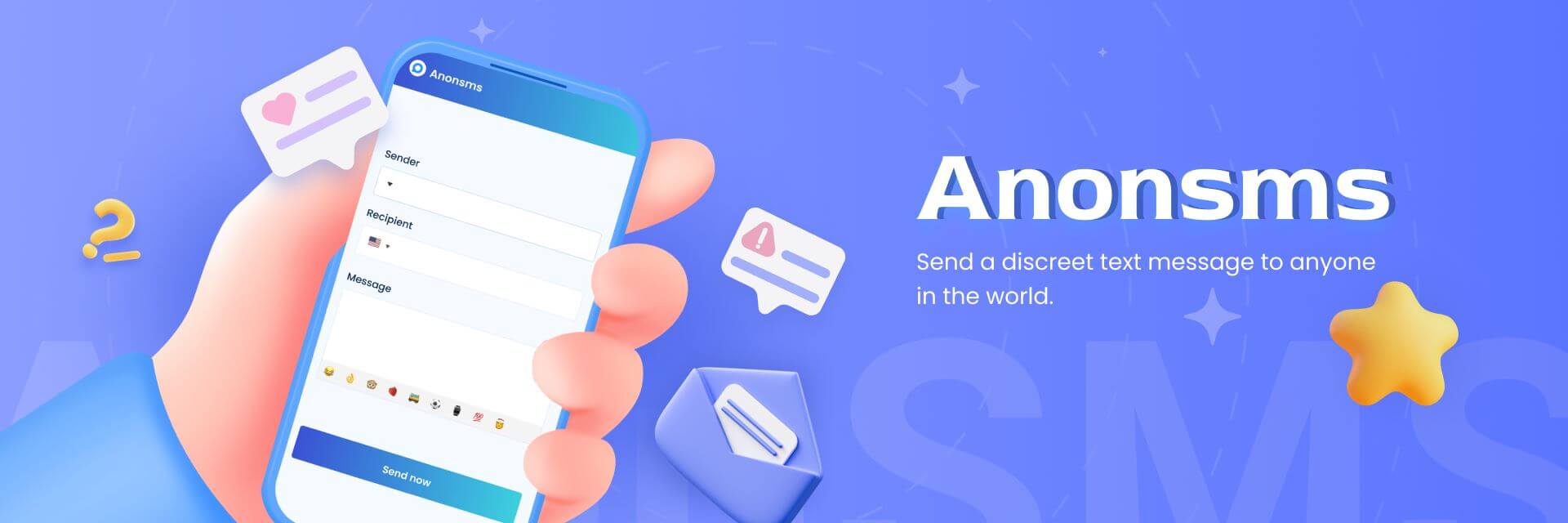
Основные особенности анонимности
- Нет необходимости устанавливать приложение или регистрировать учетную запись с помощью номера телефона.
- Вы можете отправлять личные текстовые сообщения в любую точку мира.
- Вы можете получать ответы на свои сообщения, оставаясь при этом анонимным.
- Гибкий кредитный план — 1 кредит стоит всего $0.60.
- Бонусы остаются на счету до тех пор, пока не будут использованы; срок их действия не истекает.
Как использовать анонимность
- Перейти к Анонс-сайт и выберите Идентификатор отправителя Вы хотите, чтобы человек это увидел.
- Введите номер телефона получателя. Для международных сообщений выберите правильный код страны.
- Введите свое сообщение и нажмите Отправить СМС доставить текстовое сообщение мгновенно.
Воспользуйтесь приложением для получения временного номера.
Вместо того чтобы использовать свой личный номер для отправки сообщения, приложение для временных номеров предоставляет вам новые телефонные номера. Когда вы закончите, вы можете удалить номер.
Вот некоторые из лучших приложений для временных номеров:
1. Горелка

Приложение Burner позволяет выбрать предпочитаемый номер телефона с местным кодом города. Это означает, что вы можете выбрать номер, имеющий тот же код страны, что и человек, с которым вы пытаетесь связаться.
Это приложение предлагает 7-дневный бесплатный пробный период. После этого вам нужно будет оформить подписку. Для регистрации требуется либо ваш личный номер телефона, либо адрес электронной почты, что может поставить под угрозу вашу конфиденциальность. Кроме того, приложение использует одни и те же номера для всех пользователей, а это значит, что анонимность не гарантирована.
2. Притихший

Как и приложение Burner, Hushed позволяет выбрать временный номер в любом телефонном коде по вашему выбору. Одной из отличительных особенностей приложения Hushed является возможность управления несколькими номерами из одной учетной записи. То есть, вы можете иметь разные дополнительные номера для разных целей.
Однако, к недостаткам можно отнести необходимость оформления подписки, а неактивные номера могут истечь в зависимости от выбранного вами тарифного плана.
3. TextNow

Временные номера от TextNow можно использовать для отправки текстовых сообщений через Wi-Fi или мобильный интернет. Эти номера в основном активны в США и Канаде. Сервис привлекателен тем, что предлагает бесплатный вариант, что делает его доступным для многих пользователей.
Однако бесплатная версия содержит много рекламы, которая может раздражать, а неактивные номера часто переназначаются. Кроме того, некоторые платформы отклоняют номера TextNow в процессе верификации.
Отправьте письмо на указанный ими номер телефона, используя свой адрес электронной почты.
Ещё один эффективный способ отправки личных текстовых сообщений — использование шлюза «электронная почта — SMS». Многие операторы мобильной связи позволяют отправлять электронные письма на телефонные номера, но эти письма будут доставлены в виде SMS. Для этого необходимо знать номер телефона получателя и оператора мобильной связи, которым он пользуется. У каждого оператора мобильной связи есть своё доменное имя.
Начните с составления нового электронного письма, как обычно. Но вместо адреса электронной почты получателя введите номер телефона получателя, а затем доменное имя его оператора связи. Например, если человек пользуется услугами AT&T, вы напишете: 123456789@txt.att.net.
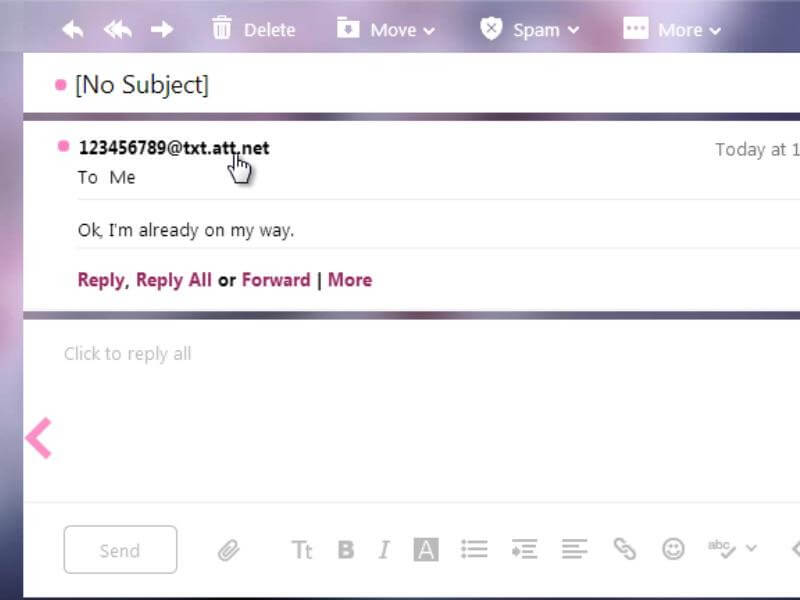
К числу других популярных доменных имён операторов связи относятся:
- Verizon: @vtext.com
- Sprint: @messaging.sprintpcs.com
- T-Mobile: @tmomail.net
- Metro PCS: @mymetropcs.com
Единственный недостаток этого метода заключается в том, что не все операторы связи поддерживают услугу преобразования электронной почты в текстовые сообщения.
Используйте VoIP
Возможно, вам известна технология передачи голоса по интернет-протоколу (VoIP) как инструмент для свяжитесь с тем, кто заблокировал вас в телефонных звонках., Но его также можно использовать для отправки личных текстовых сообщений. VoIP-сервисы передают ваше сообщение в цифровом виде через облако и отправляют его через временный телефонный номер, подключенный к интернету.

Для начала вам нужно зарегистрироваться в VoIP-сервисе, и вам будет присвоен виртуальный номер. Таким образом, вместо вашего личного номера, который вы отправляете, получатель увидит виртуальный номер.
Основная проблема, связанная с услугами VoIP, заключается в их высокой стоимости по сравнению с другими вариантами. Многие из них предназначены для предоставления комплексных коммуникационных решений для бизнеса. Самые дешевые услуги VoIP — это Dialpad, Nextiva и Grasshopper, стоимость которых составляет около $15 в месяц.
Поэтому большинство людей предпочитают использовать Google Voice, поскольку он бесплатный. Однако Google Voice доступен в основном только в США и привязан к вашей учетной записи Google, а это значит, что ваша личность практически не скрыта.
Отключите определитель номера.
Ещё один Простой способ заблокировать свой номер и сохранить конфиденциальность. Стоит упомянуть об отключении определителя номера. Однако этот метод эффективен только в том случае, если вы хотите совершать анонимные звонки.
Это можно сделать как на iPhone, так и на устройствах Android. Просто выполните следующие шаги:
айфон
- Перейти к Настройки.
- Прокрутите вниз, чтобы нажать на Приложения а затем выберите Телефон.
- Нажмите на Показать мой идентификатор вызывающего абонента и выключите кнопку.
андроид
- Перейдите в свой Телефон и нажмите на три точки справа.
- Нажмите на Настройки.
- Выбирать Вызов учетных записей или Дополнительные услуги (в зависимости от типа вашего устройства).
- Кран Идентификатор вызывающего абонента.
- Выбирать Скрыть номер или Никогда (в зависимости от типа вашего устройства).
Заключительные размышления
Теперь, когда вы знаете, как отправить личное сообщение, выбор подходящего для вас способа зависит от ваших потребностей в конфиденциальности и удобства. Каждый из рассмотренных выше вариантов может помочь вам скрыть свой номер телефона. Однако, если вам нужна полная анонимность, Anonsms — лучший вариант: он не связывает вашу личную информацию с сообщением и не сохраняет ваш IP-адрес или местоположение.
Часто задаваемые вопросы
Все еще не понимаете, как отправить анонимное текстовое сообщение? Ознакомьтесь с нашими ответами на часто задаваемые вопросы. Они вам помогут.
Могу ли я отправить личное текстовое сообщение?
Да, вы можете отправлять личные текстовые сообщения. Самый безопасный способ сделать это — через Anonsms. Он обеспечивает полную защиту вашей конфиденциальности. Вам не нужно скачивать или устанавливать какое-либо приложение, и вам не нужно рисковать своей безопасностью, регистрируя аккаунт.
Могу ли я отправлять текстовые сообщения со значением *67?
Нет, нельзя. Код *67 позволяет скрыть идентификатор вызывающего абонента во время телефонных звонков.. При отправке текстовых сообщений ваш номер телефона не скрывается.
Как отправить личное текстовое сообщение на iPhone?
Самый безопасный способ отправить личное текстовое сообщение на iPhone — использовать приложение для временного номера телефона, например, Burner, Hushed или TextNow. Эти приложения предоставляют альтернативный номер телефона, позволяющий отправлять текстовые сообщения, не раскрывая свой личный номер.
Статьи по теме:
Безопасно и анонимно: лучший способ отправлять международные текстовые сообщения
Как отправить анонимный комплимент, который поднимет кому-то настроение?


 Russian
  English
  German
  Spanish
  Italian
  Turkish
  French
  Portuguese
  Czech
Czech  Finnish
  Danish