
 Anonsmi
 NotifyPartners


WhatsApp ha reso facile rimanere in contatto con amici e familiari nel corso degli anni. A volte, però, questa comunicazione diventa difficile. Ti accorgi che un contatto smette di rispondere ai tuoi messaggi, indipendentemente da come cerchi di contattarlo su WhatsApp.
A quel punto ti chiederai se ti hanno bloccato o se semplicemente stanno ignorando i tuoi messaggi. WhatsApp non ti avviserà di essere stato bloccato. Piuttosto, ti fornirà degli indizi per aiutarti a capire cosa è successo.
In questa guida imparerai come scoprire se qualcuno ti ha bloccato su WhatsApp, senza dovergli inviare un messaggio.
Come verificare se qualcuno ti ha bloccato su WhatsApp
Sebbene WhatsApp non invii una notifica diretta quando vieni bloccato, ci sono diversi indicatori che puoi osservare per farti un'idea della situazione. Se più segnali compaiono contemporaneamente, è più probabile che tu sia stato bloccato.
Verifica il loro ultimo accesso o stato online
Questa è una delle prime cose che si notano quando si viene bloccati su WhatsApp. Il loro ultimo accesso o stato online non compare più nella chat.
Se sei certo che il destinatario in precedenza mostrasse la sua attività e questa scompaia improvvisamente, potrebbe significare che ti ha bloccato. Tuttavia, questa non è una prova sufficiente, poiché WhatsApp consente agli utenti di disattivare questa funzione nelle impostazioni sulla privacy.
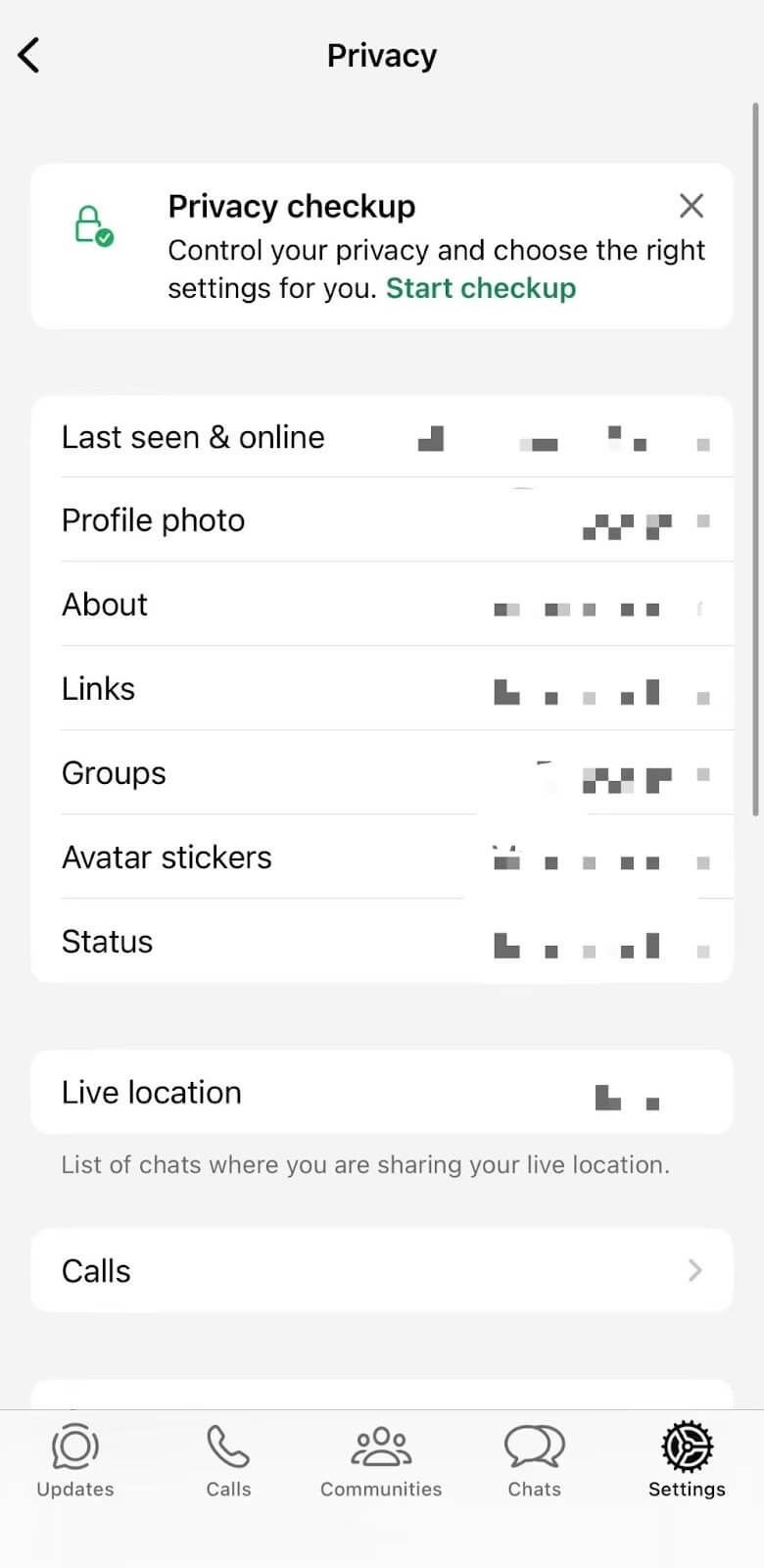
Per questo motivo, non dovresti concludere di essere stato bloccato quando il loro stato di attività scompare.
Verifica eventuali modifiche alla foto del profilo.
Quando una persona ti blocca Su WhatsApp, non potrai più vedere la loro foto del profilo. Anche se sei sicuro che abbiano cambiato l'immagine del profilo, tutto ciò che vedrai sarà un avatar vuoto o quello predefinito di WhatsApp.
NotaDP in WhatsApp significa "Display Picture" (Immagine del profilo). Si riferisce all'immagine del profilo che un utente sceglie per rappresentare il proprio account.
Analogamente allo stato di attività di WhatsApp, gli utenti possono anche modificare le proprie impostazioni sulla privacy per nascondere la propria immagine del profilo.
Invia un messaggio e seleziona le caselle di controllo
Puoi anche verificare se sei stato bloccato su WhatsApp prestando attenzione ai segni di spunta che compaiono dopo aver inviato un messaggio. Se ti stai chiedendo cosa significano i segni di spunta su WhatsApp, ecco una breve spiegazione.
- Un segno di spunta grigio = Messaggio inviato dal tuo dispositivo
- Due segni di spunta grigi = Messaggio consegnato o Messaggio letto (se le conferme di lettura sono disattivate)
- Due segni di spunta blu = Messaggio letto (se le conferme di lettura sono abilitate)
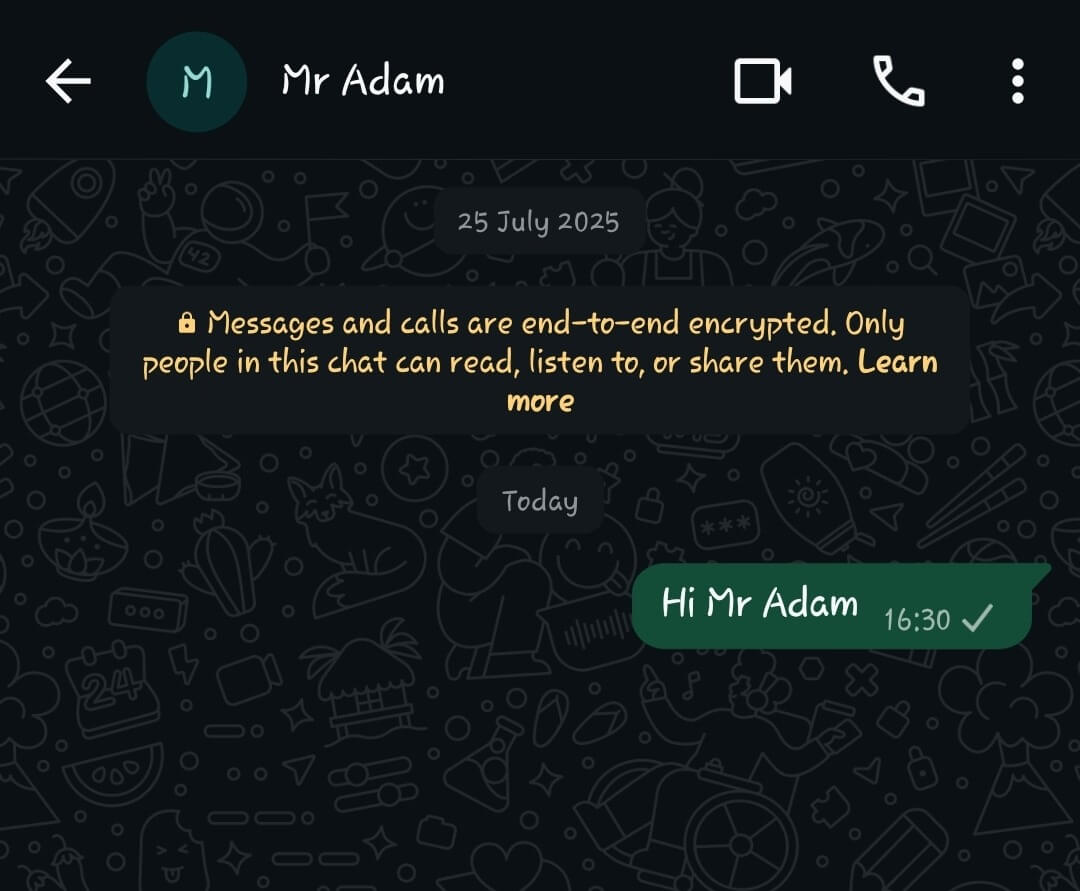
Se dopo aver inviato un messaggio compare un segno di spunta grigio, potrebbe essere dovuto a:
- Il destinatario è offline
- Il loro telefono è spento
- Non hanno connessione internet
- Potresti essere stato bloccato
Prova a chiamarli su WhatsApp
Molte persone preferiscono effettuare una chiamata vocale WhatsApp non appena si accorgono di essere state bloccate, e questo è comprensibile. Quando si chiama qualcuno normalmente, la chiamata dovrebbe squillare sul suo dispositivo. Se le chiamate falliscono sistematicamente o non squillano mai, potrebbe essere un altro segnale.
Tuttavia, è bene sapere che una connessione di rete scadente da parte del destinatario può causare un risultato simile. Per questo motivo, questo indizio va considerato insieme ad altri indicatori.
Prova ad aggiungerli a un gruppo WhatsApp
Crea un nuovo gruppo e prova ad aggiungere il contatto. Se WhatsApp visualizza un messaggio che indica che non hai l'autorizzazione per aggiungere la persona, è molto probabile che tu sia stato bloccato.
Questo è spesso considerato uno degli indicatori più forti e risulta più affidabile rispetto alla visualizzazione delle immagini del profilo o al numero di messaggi ricevuti. Tuttavia, è anche possibile che la persona abbia limitato chi può aggiungerla ai gruppi tramite le impostazioni sulla privacy di WhatsApp.
Perché i segnali di blocco non sono sempre chiari
È comprensibile voler sapere con certezza se si è stati bloccati su WhatsApp, ma WhatsApp evita intenzionalmente di fornire una conferma diretta. In questo modo, tutela la privacy degli utenti e previene le molestie.
Di conseguenza, ognuno dei segnali che abbiamo analizzato può potenzialmente avere un'altra spiegazione. Ad esempio:
- Le impostazioni sulla privacy potrebbero nascondere le informazioni sull'ultimo accesso.
- Problemi di connessione a Internet possono impedire la consegna dei messaggi.
- Gli utenti possono rimuovere le foto del profilo.
- I telefoni possono rimanere spenti per periodi prolungati.
Il modo migliore per affrontare la questione è cercare più segnali che compaiono simultaneamente, piuttosto che concentrarsi su un singolo indizio.
Cerchi altri modi per contattare qualcuno se sei stato bloccato su WhatsApp?
Se pensi di essere stato bloccato su WhatsApp, potresti comunque aver bisogno di contattare la persona per motivi legittimi, e in situazioni come queste i metodi di comunicazione alternativi possono essere utili. Puoi provare con l'email, i social media, gli SMS tradizionali o altre app di messaggistica.
Inoltre, tramite Anonsms puoi inviare messaggi privati alla persona senza rivelare il tuo numero di telefono personale. La piattaforma ti permette di inviare messaggi di testo anonimi In tutto il mondo, senza dover scaricare software o registrarsi con i propri dati.
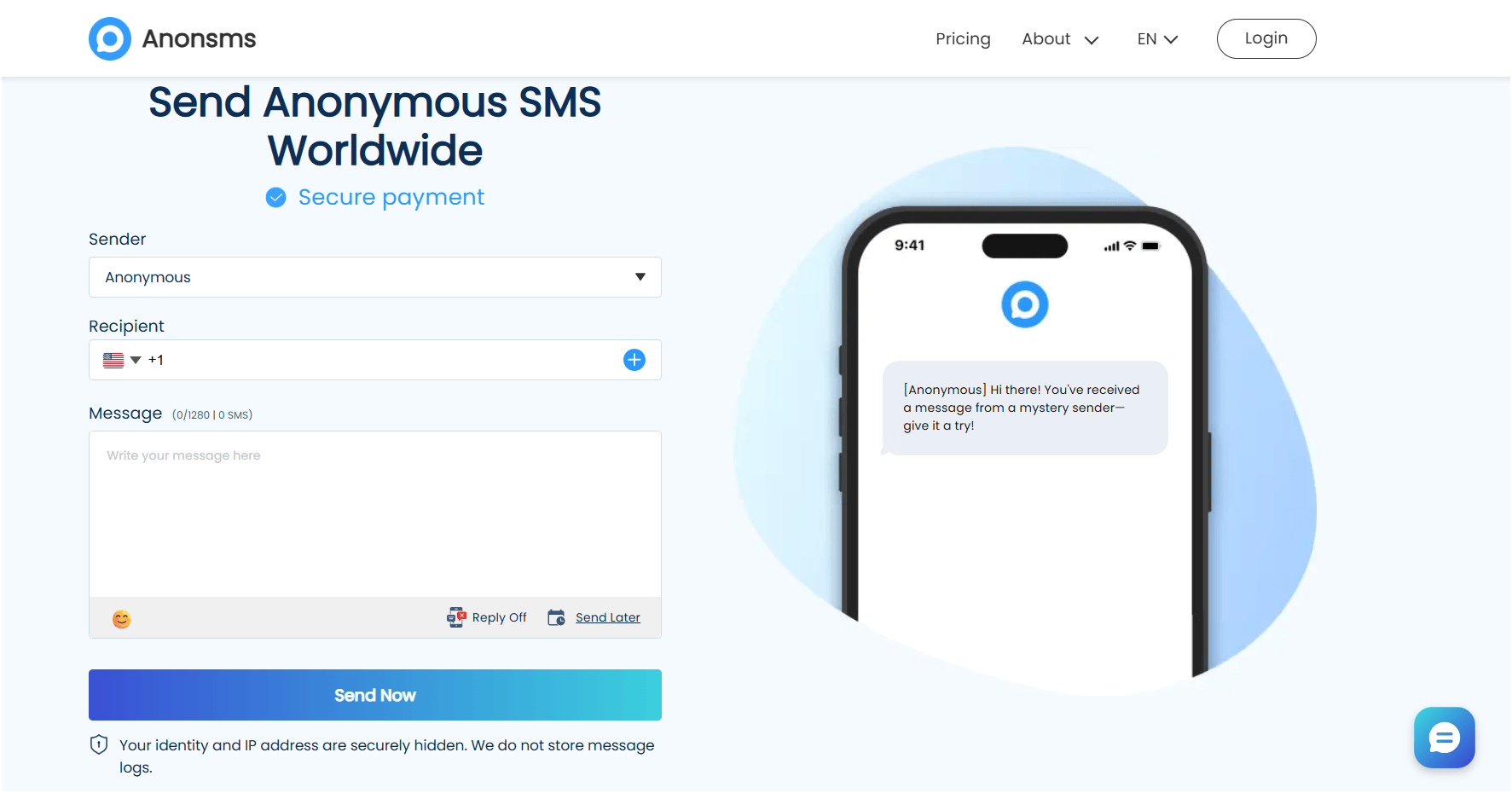
Alcuni usi comuni includono:
- Invio di feedback anonimi
- Promemoria di condivisione
- Contattare qualcuno quando la privacy è importante
- Invio di messaggi senza rivelare il proprio numero personale
Per utilizzare Anonsms, è sufficiente digitare il numero di telefono del destinatario, scegliere un nome o uno pseudonimo per il mittente, scrivere il messaggio e inviarlo.
Tuttavia, è fondamentale rispettare sempre la privacy del destinatario e le leggi locali quando si utilizzano questi metodi di comunicazione alternativi.
Messaggistica (privata) oltre WhatsApp
Pur essendo importante comprendere i segnali, è altrettanto importante rispettare i confini personali dei destinatari. Se qualcuno ha bloccato intenzionalmente i tuoi contatti, tentare ripetutamente di aggirare la sua decisione non è appropriato.
Valuta invece se hai validi motivi per riallacciare i rapporti attraverso canali alternativi come e-mail, social media o SMS. Inoltre, strumenti come Anonsms possono essere utili quando è necessaria la privacy, ma tutte le comunicazioni devono rimanere rispettose, lecite e premurose.
Domande frequenti
Come capire se qualcuno ti ha bloccato su WhatsApp?
Il modo migliore per capire se qualcuno ti ha bloccato su WhatsApp è cercare diversi segnali contemporaneamente. Mancanza di aggiornamenti del profilo, assenza di stato "Ultimo accesso", messaggi bloccati su una sola spunta, chiamate non riuscite e impossibilità di aggiungere la persona a un gruppo possono indicare, nel loro insieme, un blocco.
Cosa significa una spunta su WhatsApp?
Un singolo segno di spunta grigio indica che il messaggio è stato inviato dal tuo dispositivo ma non ha ancora raggiunto il telefono del destinatario. Ciò può accadere a causa di problemi di connessione, un dispositivo offline o un possibile blocco.
Cosa significano le spunte su WhatsApp?
Un segno di spunta grigio su un messaggio WhatsApp significa che è stato inviato, due segni di spunta grigi significano che è stato consegnato, mentre due segni di spunta blu generalmente indicano che il messaggio è stato letto. Tieni presente che le conferme di lettura devono essere abilitate affinché i segni di spunta blu vengano visualizzati nella chat.
Cosa significa "nessuna risposta" su WhatsApp?
Quando chiami qualcuno e non ricevi risposta, significa semplicemente che il destinatario non ha risposto. Potrebbe essere occupato, offline, avere problemi di connessione o aver scelto di non rispondere.
Come faccio a sapere se qualcuno mi ha bloccato su WhatsApp senza mandargli un messaggio?
Esistono diversi segnali rivelatori che puoi verificare su WhatsApp senza inviare un singolo messaggio, dai cambiamenti nella visibilità del profilo alle modalità di aggiornamento dello stato. Consulta l'elenco completo e scopri come verificare ciascun segnale nell'articolo. Nessuno di questi segnali, preso singolarmente, è una prova inconfutabile, ma quando se ne presentano diversi contemporaneamente, il blocco diventa molto probabile.
Che cos'è il soft blocking su WhatsApp?
Il blocco temporaneo (soft blocking) si riferisce generalmente alla rimozione o alla limitazione temporaneamente dei contatti senza utilizzare la funzione di blocco permanente di WhatsApp. Il termine è informale e non rappresenta una funzionalità ufficiale di WhatsApp. Se qualcuno ti blocca temporaneamente, i tuoi messaggi potrebbero comunque essere recapitati, ma la persona in questione potrebbe scegliere di non rispondere.
Posso ancora vedere l'immagine del profilo se sono bloccato su WhatsApp?
In molti casi, una volta bloccato un utente, non potrai più visualizzare le immagini del profilo né i futuri aggiornamenti. Tuttavia, le impostazioni sulla privacy possono produrre risultati simili, quindi non dovresti considerarlo una prova definitiva.
Come sapere se qualcuno ti ha bloccato (100%)?
Non esiste un metodo garantito per sapere con certezza di essere stati bloccati. WhatsApp evita intenzionalmente di fornire notifiche dirette. Tuttavia, osservare diversi segnali insieme può fornire degli indizi.
È possibile bloccare qualcuno su WhatsApp?
Sì, puoi farlo facilmente contatti a blocco Tramite le impostazioni sulla privacy di WhatsApp. Il blocco impedisce la condivisione di messaggi, chiamate e alcune informazioni del profilo con il contatto bloccato.
Se blocco qualcuno su WhatsApp, lo saprà?
No, WhatsApp non invia notifiche quando una persona viene bloccata. Tuttavia, potrebbe notare diversi segnali, come messaggi non recapitati, aggiornamenti del profilo mancanti e tentativi falliti di aggiungerla ai gruppi.
Articoli correlati:
Come scoprire se qualcuno ti ha bloccato su iMessage
Le 16 migliori app per messaggi anonimi per conversazioni private (Guida 2026)
Come bloccare il tuo numero: 5 semplici modi per mantenere la tua privacy

 Italian
  English
  German
  Spanish
  Turkish
  French
  Russian
  Portuguese
  Czech
Czech  Finnish
  Danish