
 Anonymes
 NotifierPartenaires


Si vous lisez ceci, c'est probablement parce que vous vous demandez si quelqu'un vous a bloqué sur Discord. Cette personne a sans doute cessé de répondre à vos messages ou a soudainement disparu de vos conversations.
Dans ce genre de cas, on pourrait facilement supposer qu'ils vous ont bloqué, mais on ne peut pas en être totalement certain car Discord ne vous enverra aucune notification officielle. Il vous faudra donc chercher les indices vous-même, et croyez-moi, ils sont faciles à trouver.
Ce guide explique comment savoir si quelqu'un vous a bloqué sur Discord et ce qui se passe lorsque vous êtes bloqué sur Discord.
Comment vérifier si quelqu'un vous a bloqué sur Discord
Pour le découvrir si vous avez été bloqué Sur Discord, il faut chercher des indices, comme par exemple s'ils sont toujours dans votre liste d'amis, si vous pouvez leur envoyer une demande d'ami ou si vos messages sont bien reçus.
Essayez de leur envoyer une demande d'ami
C'est le moyen le plus simple de savoir si quelqu'un vous a bloqué, surtout si vous n'étiez pas amis sur Discord auparavant. Il vous suffit de rechercher son nom d'utilisateur et de lui envoyer une demande d'ami.
Si vous recevez une notification indiquant que la demande d'ami a été envoyée, il y a de fortes chances que la personne ne vous ait pas bloqué. En revanche, si vous recevez un message d'erreur indiquant :
Hmm, ça n'a pas marché. Vérifiez que le nom d'utilisateur est correct.
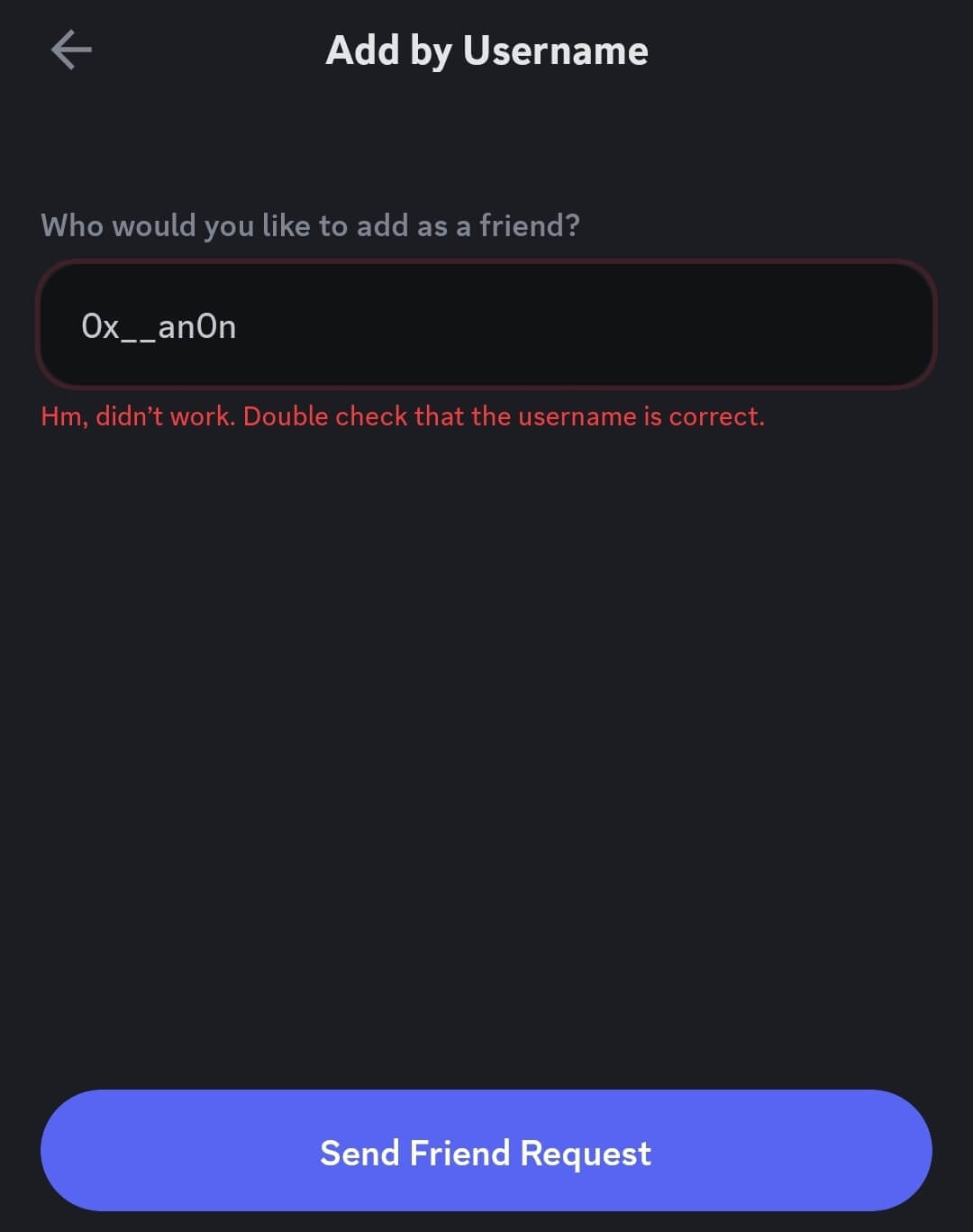
Ceci indique fortement que vous avez été bloqué. Cependant, n'oubliez pas que des changements de nom d'utilisateur, de paramètres de confidentialité ou des problèmes de serveur peuvent parfois déclencher des messages similaires.
Envoyez-leur un message direct
Vous pouvez aussi vérifier si vous avez été bloqué sur Discord en envoyant un message privé à la personne concernée dans votre conversation. Cette méthode est particulièrement efficace si vous avez déjà discuté avec elle avant qu'elle ne vous bloque.
Normalement, votre message devrait être distribué immédiatement. Cependant, si vous êtes bloqué, Discord peut empêcher sa distribution et afficher un message d'erreur indiquant qu'il n'a pas pu être remis.
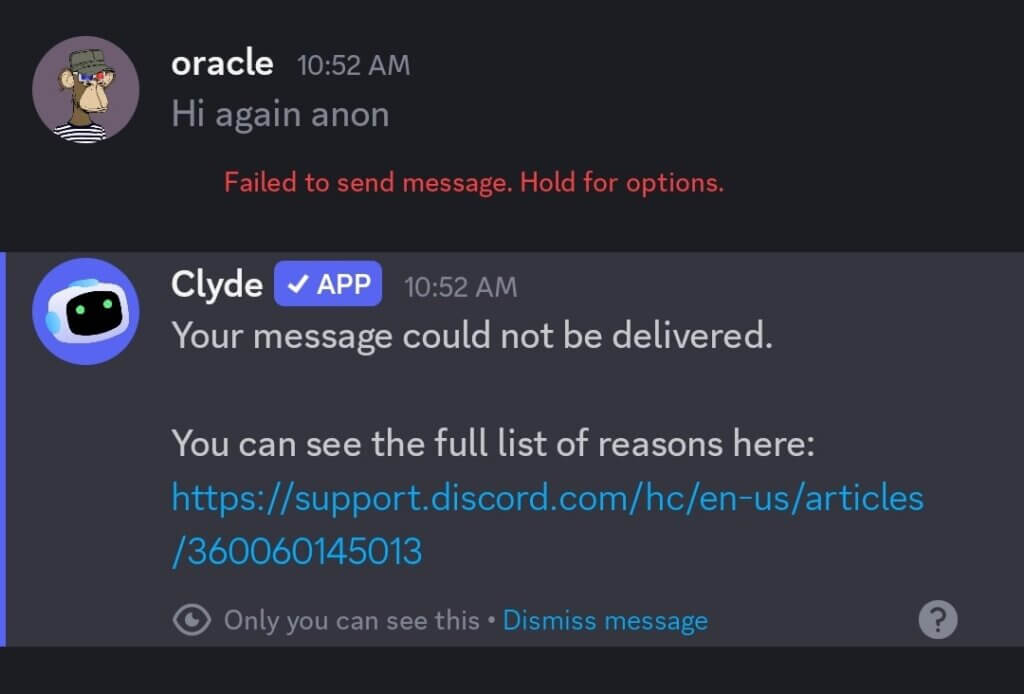
Notez également que cela ne suffit pas toujours à conclure qu'une personne vous a bloqué. Dans certains cas, elle peut avoir désactivé les messages privés provenant d'inconnus ou de membres du serveur. Cependant, combiné à d'autres indices, cela peut vous aider à savoir si vous avez été bloqué.
Utilisez le test de réaction sur leurs messages.
La plupart des utilisateurs de Discord utilisent le test de réaction pour déterminer s'ils ont été bloqués par d'autres utilisateurs du même serveur. Vous pouvez également utiliser cette méthode si vous n'êtes pas ami avec la personne qui, selon vous, vous a bloqué.
Trouvez un message que cette personne a précédemment publié sur un serveur partagé et essayez d'y réagir à l'aide d'un emoji.
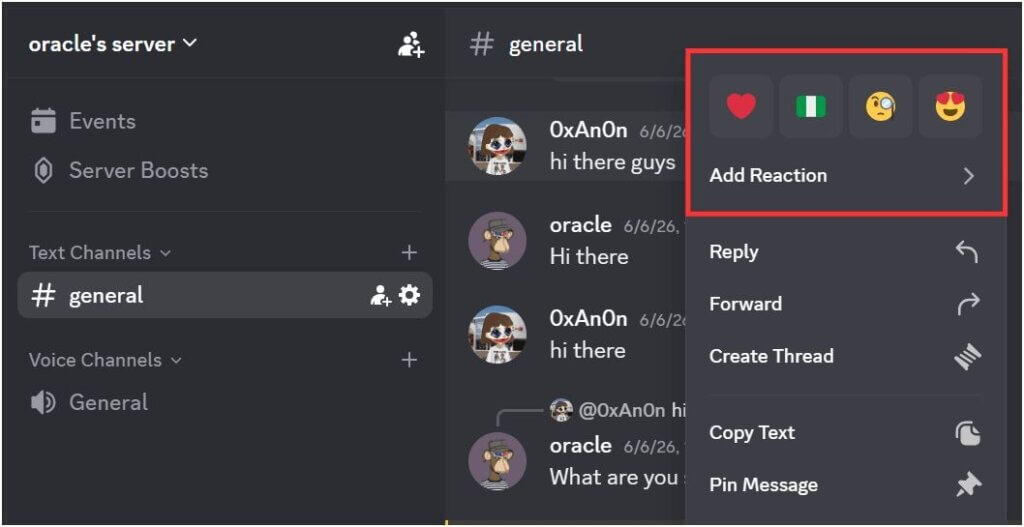
Si vous êtes bloqué, Discord empêchera l'ajout de la réaction. Celle-ci pourrait s'afficher puis disparaître subitement. C'est un autre indice important permettant de savoir si quelqu'un vous a bloqué.
Toutefois, ne vous fiez pas uniquement à ce signe. Parfois, des problèmes techniques et des paramètres de confidentialité peuvent en être la cause.
Consultez leur profil Discord
Discord permet toujours de consulter certaines parties du profil d'un utilisateur même après son blocage. Cela fonctionne notamment si vous utilisez le même serveur ou si vous étiez auparavant amis avec cette personne.
Cependant, certaines interactions avec les profils pourraient être limitées. Par exemple, des informations comme leur bio et les serveurs en commun pourraient ne plus être visibles. Vous pourrez uniquement voir leur date d'inscription sur Discord.
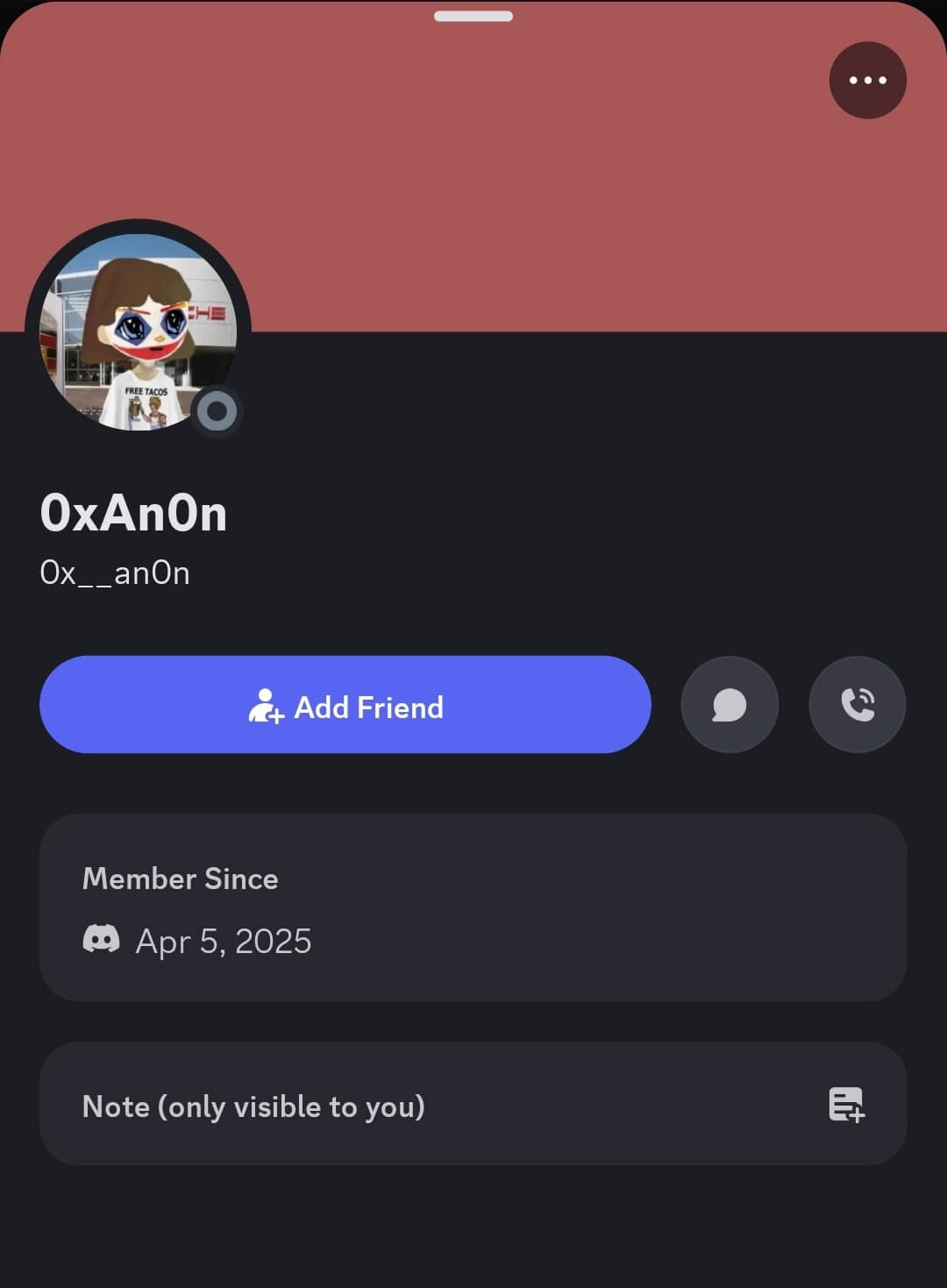
Bien que cela ne confirme pas à lui seul un blocage, cela peut contribuer à dresser un tableau d'ensemble lorsqu'on le combine avec d'autres indices tels que les messages non reçus, les réactions et les demandes d'amis.
Vérifiez si vous partagez toujours des serveurs et des canaux.
Le fait d'être bloqué sur Discord ne vous retire pas automatiquement des serveurs partagés. Cependant, vous verrez un “Aucun serveur en commun” Ce message figure sur leur profil, même si vous partagez encore certains serveurs. ».
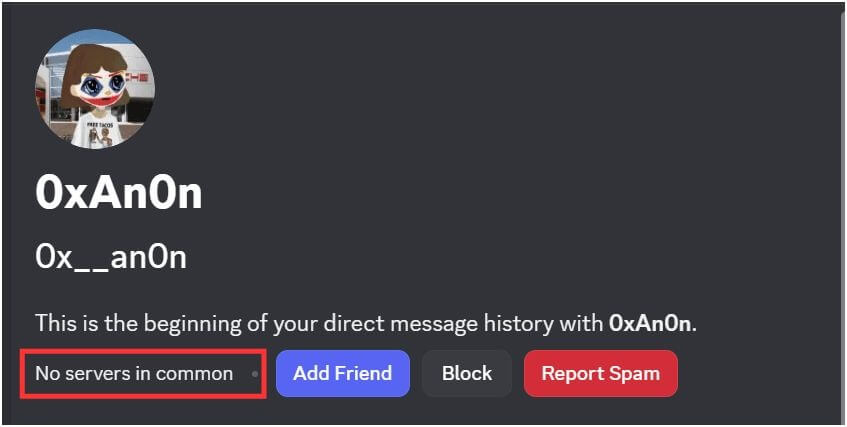
Vous pourrez toujours voir leurs messages, leur profil et leur activité au sein des communautés communes. Vous pourrez même toujours répondre à vos messages respectifs sur le serveur. Par conséquent, ce n'est pas une méthode très fiable pour savoir si quelqu'un vous a bloqué sur Discord, à moins d'explorer d'autres options comme réagir à ses messages sur le serveur ou le salon.
Vérifiez leur statut en ligne
Peut-on savoir si quelqu'un nous a bloqué sur Discord en consultant son statut en ligne ?
Lorsque vous êtes sur un serveur partagé avec une autre personne, vous pouvez généralement voir son statut en ligne : en ligne, inactif, en mode « Ne pas déranger » ou hors ligne. Si cette personne vous a bloqué, son statut peut apparaître comme hors ligne même si des amis communs la signalent comme active. En effet, Discord masque les informations de statut aux utilisateurs bloqués.
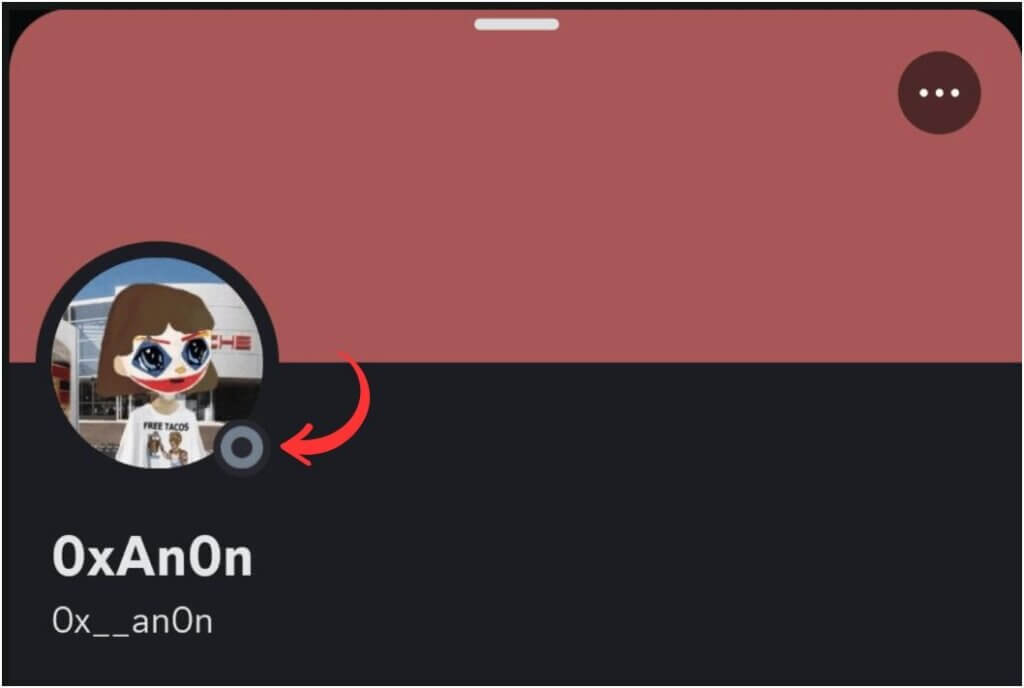
Malheureusement, les indicateurs de statut ne sont pas toujours fiables, car les utilisateurs peuvent se mettre manuellement en mode invisible tout en continuant d'utiliser Discord normalement. Cependant, si une personne apparaît constamment hors ligne tout en présentant d'autres signes de comportement bloquant, cela peut confirmer vos soupçons.
Éléments à prendre en compte avant de supposer que vous êtes bloqué sur Discord
Avant de conclure que quelqu'un vous a bloqué sur Discord, prenez le temps d'envisager d'autres possibilités. En voici quelques exemples :
- Il se peut qu'ils aient désactivé les messages directs pour tout le monde.
- Leurs paramètres de confidentialité peuvent restreindre les nouvelles demandes d'amis.
- Ils pourraient utiliser le mode invisible, ce qui vous empêcherait de voir leur statut en ligne.
- Discord rencontre peut-être des problèmes de serveur temporaires.
- L'utilisateur a peut-être changé son nom d'utilisateur.
- Ils sont peut-être tout simplement inactifs ou en pause sur Discord pour le moment.
La meilleure façon de déterminer si quelqu'un vous a bloqué sur Discord est d'examiner plusieurs signes simultanément, plutôt que de se fier à un seul indicateur.
Que faire si vous êtes bloqué sur Discord ?
Se faire bloquer sur Discord peut être très désagréable. Voici quelques conseils pour vous aider.
- Laissez faire le temps.
Certains utilisateurs peuvent choisir de vous bloquer temporairement jusqu'à ce qu'ils se sentent à l'aise de vous ajouter à nouveau comme ami.
- Réfléchissez à la situation
Essayez de comprendre ce qui a pu les inciter à vous bloquer. Vous serez mieux à même de décider de la suite des événements une fois la cause profonde comprise.
- Contactez-le par l'intermédiaire d'un ami commun.
En cas de malentendu, vous pouvez demander à un contact commun de transmettre un message demandant pourquoi la personne vous a bloqué(e).
- Essayez une autre chaîne
Si vous avez leur numéro de téléphone et que vous souhaitez les contacter sans avoir à vous identifier, vous pouvez utiliser Anonymes Envoyer un SMS anonyme est un outil en ligne qui permet d'envoyer un message sans révéler son identité.
Réflexions finales
Apprendre à savoir si quelqu'un vous a bloqué sur Discord peut être frustrant car Discord ne fournit pas de notification directe.
Il est toujours important de combiner des indicateurs tels que les demandes d'amis refusées, les problèmes de distribution des messages, les erreurs de réaction et les limites d'interaction avec le profil. L'analyse de la tendance générale vous permettra de comprendre rapidement la situation.
Questions fréquemment posées
Comment savoir si quelqu'un vous a bloqué sans lui envoyer de message sur Discord ?
Vous pouvez le vérifier en envoyant une demande d'ami, en essayant de réagir à leurs messages, en consultant les interactions de leur profil ou en vérifiant si Discord affiche des erreurs lorsque vous essayez de vous connecter avec eux.
Qu'est-ce que le blocage souple sur Discord ?
Le blocage partiel consiste à retirer une personne de votre liste d'amis sans la bloquer définitivement. L'utilisateur peut toujours interagir avec vous sur les serveurs partagés, mais la connexion d'ami directe est supprimée.
Si je bloque quelqu'un sur Discord, le saura-t-il ??
Non, ils ne le sauront pas, car Discord n'envoie pas de notification aux utilisateurs bloqués. Cependant, ils pourraient finir par s'en apercevoir par le biais de demandes d'amis refusées, de problèmes de distribution de messages ou de restrictions de réactions. Ces indices peuvent les aider à soupçonner qu'ils ont été bloqués.
À quoi ça ressemble quand on bloque quelqu'un sur Discord ?
Lorsque vous bloquez une personne, Discord limite les interactions entre vos deux comptes. Les messages directs sont restreints, les demandes d'amis sont bloquées et les réactions dans les serveurs ou salons partagés peuvent ne pas fonctionner. Cependant, vous pouvez toujours vous voir dans les serveurs partagés, selon les paramètres de la communauté.
Articles connexes :
Comment envoyer un SMS à quelqu'un qui vous a bloqué ? [4 méthodes à ne pas manquer]
Comment savoir si quelqu'un vous a bloqué sur iMessage
Les 16 meilleures applications de messagerie anonyme pour des conversations privées (Guide 2026)

 French
  English
  German
  Spanish
  Italian
  Turkish
  Russian
  Portuguese
  Czech
Czech  Finnish
  Danish