
 Anonsms
 Gentell


Let’s go straight to the elephant in the room: does #31# work for sending anonymous text messages? The answer is NO.
Many people in the Netherlands believe otherwise, and this is because the #31# code does help to hide phone numbers while calling, so it has become a popular assumption that the same can be done for messages.
Unfortunately, SMS works very differently. When you send a text message, your number will still be shown, regardless of the code you dial beforehand.
The bottom-line is that you need a more secure solution if you really want to keep your identity a secret. In this article, we will explore the best method to send anonymous SMS on iPhone and Android without compromising your safety.
Why iPhone & Android Settings Don’t Hide Your Number
Quickly, let’s examine why it’s impossible to hide mobile number using the #31# when you send a text:
- iPhone Settings: On iPhone, users often go to Settings > Phone > Show My Caller ID and turn it off. That setting only hide your number for phone calls. It has zero impact on SMS. When you send a text message, your phone number is still transmitted through your carrier’s managing system.
- iMessage Risk: Another misconception on iPhone is the belief that SMS are anonymous when sent through iMessage. The truth is that your Sender ID is linked to your Apple ID, which means you can still be identified.
- Android Settings: Similar to iPhone, you cannot send anonymous SMS on Android when you use the #31# code. The Hide Number feature on your Samsung, Pixel, and other Android devices only apply to outgoing calls, not SMS.
It’s very risky if you rely on these settings for sending private texts. They practically create a false sense of security—you think your identity is hidden, but it’s otherwise.
The Solution: Using a Web-Based SMS Gateway (AnonSMS)
To be truly anonymous, you must bypass your SIM card entirely. As long as your mobile carrier is involved, you can be discovered. The perfect solution for anonymous texting in the Netherlands is to use a Web Gateway that’s not associated in any way to your personal information. A reliable Web Gateway to use is AnonSMS—a private texting tool.
AnonSMS works by routing your text message through its own system. Instead of sending the message from your phone number, it uses the AnonSMS servers, ensuring that your message doesn’t touch the carrier’s network. This means that:
- Your real number is not exposed.
- Your IP address is stripped before delivery.
- The recipient cannot find out who you are, even when they contact their mobile carrier (be it KPN, Vodafone, Odido, or Simyo).
Step-by-Step Guide: How to Send Your First Message
Follow these steps to send anonymous SMS in the Netherlands without using the #31# text message code:
Step 1: Go to the AnonSMS Website
Open your browser (it could be Safari, Chrome, or any browser) and go to anonsms.com. The website has everything you need. You won’t be redirected to another platform or asked to download any app.
Step 2: Choose a Sender’s Name
You can choose any name you want that’s best suited for the message you’re sending. For example, if the message is to be taken seriously, you can choose “Belangrijk.” If it’s a holiday surprise message, use “Kerstman.” When you’re sending a prank text message, you can choose “Grappenmaker.”
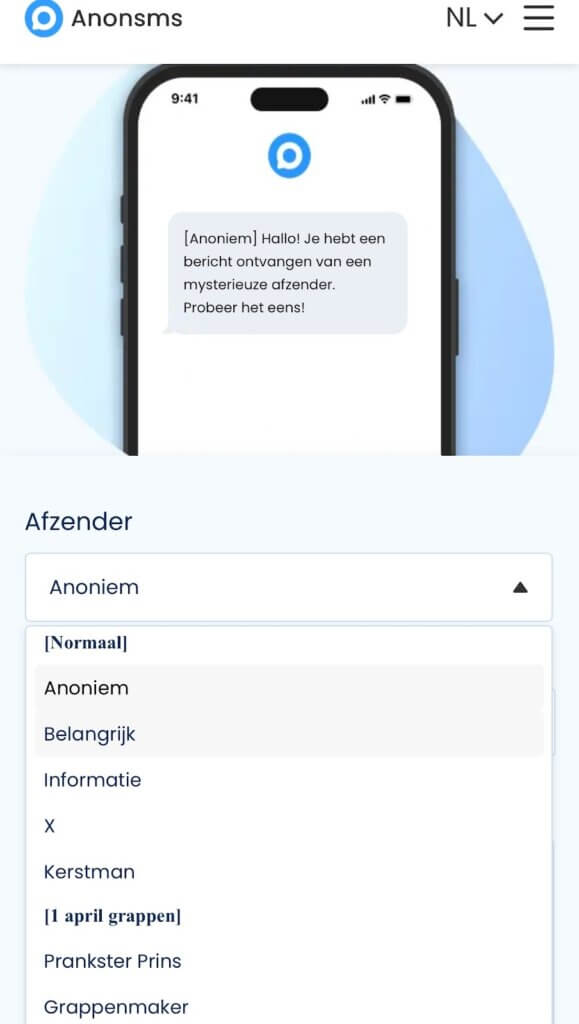
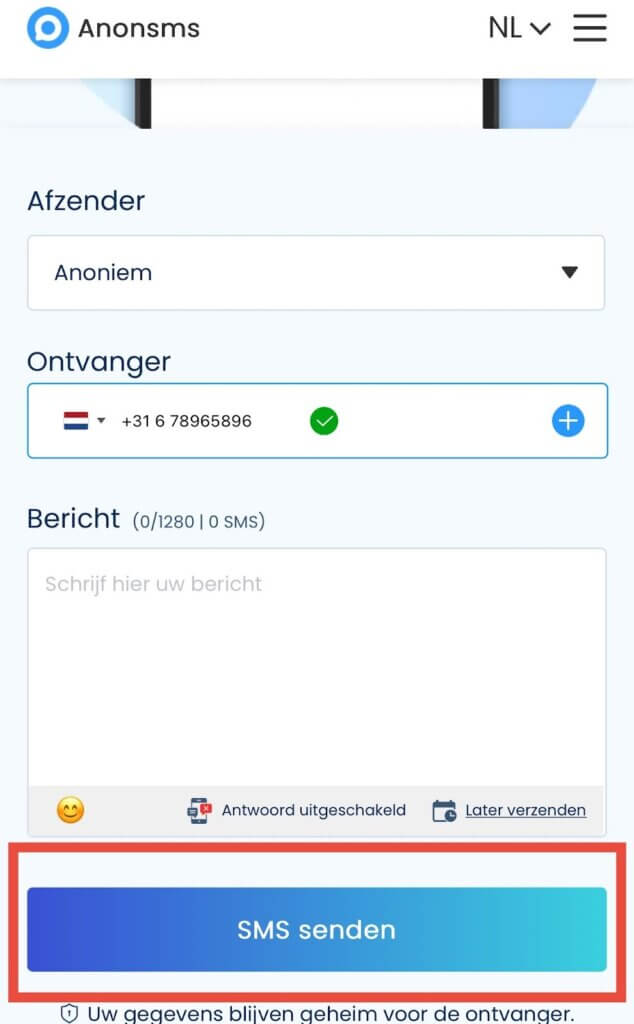
Step 3: Enter the Recipient’s Phone Number and Message
Ensure you select +31 as the country code and enter the correct phone number. This allows AnonSMS to route the message to the correct region and number. Afterwards, type in your message.
The
Step 4: Send Securely
Click on the Send SMS button and your message will be anonymously sent after you’re charged a little fee. AnonSMS uses secure payment gateways. Our paid service ensures reliability and privacy standards, similar to the security of iDEAL banking.
FAQ: Common Questions in the Netherlands
- Can the Police trace an anonymous SMS?
Yes, they can. The authorities can trace anonymous calls and SMS in criminal investigations, hence why it’s advised that you don’t use the anonymous SMS tool for illegal activities. However, for general privacy, our service keeps no logs, making it far more private than a standard SMS.
- Does the recipient see my number?
No. They can only see the “Sender Name” you chose or your SMS appear as “Anonymous” instead of your phone number.
- Is It Free?
No. While free sites exist, they often sell your data, which compromises your safety. AnonSMS charges a small fee that ensures your message reaches the recipient, without being traceable to you.
Conclusion
Don’t risk your privacy by testing if #31# works for KPN anonymous SMS or any carrier’s network in the Netherlands. The only way to send anonymous SMS on Android or iPhone is to use a dedicated Web Gateway like AnonSMS to hide your number for texts.
Try sending your first message today securely with AnonSMS!

 English
  German
  Spanish
  Italian
  Turkish
  French
  Russian
  Portuguese
  Czech
Czech  Finnish
  Danish